目录
一、Launch文件作用
- 通过XML文件实现多节点的配置和启动。
- 同时可以自动启动ROS Master(不需要单独
roscore)。
二、Launch文件语法
1. <launch>
launch文件中的根元素采用<launch>标签定义
2. <node>
启动节点:
<node pkg="package-name" type="executable-name" name="node-name" />- pkg:节点所在功能包名称
- type:节点的可执行文件名称
- name:节点运行时的名称
- 其他可选属性:
- output(是否打印日志信息)
- respawn(是否在出现错误时重启)
- require(是否要求某个节点必须启动)
- ns(namespace定义命名空间,避免命名冲突)
- args(给每个节点输入参数)
3. 参数设置
-
<param>或<param>设置系统中的参数,存储在参数服务器中
<param name="output_frame" value="abcd"/>加载参数文件中的多个参数:
<rosparam file="params.yaml" command="load" ns="params" /> -
<arg>launch文件内部的局部变量
<arg name="arg-name" default="arg-value" />
4. 重映射<remap>
重映射ROS计算图资源的命名
<remap from="/turtlebot/cmd_vel" to="/cmd_vel">5. 嵌套<include>
包含其他launch文件
<include file="$(dirname)/other.launch">三、Launch示例
1. 新建一个功能包
cd ~/catkin_ws/src
catkin_create_pkg learning_launch
2. 创建launch文件夹
在learning_launch文件夹下新建一个名为launch的文件夹。
3. 创建launch文件
在刚才创建的文件夹内新建一个文件
touchs simple.launch其内容为
<launch>
    <node pkg="learning_topic" type="person_subscriber" name="talker" output="screen" />
    <node pkg="learning_topic" type="person_publisher" name="listener" output="screen" />
</launch>
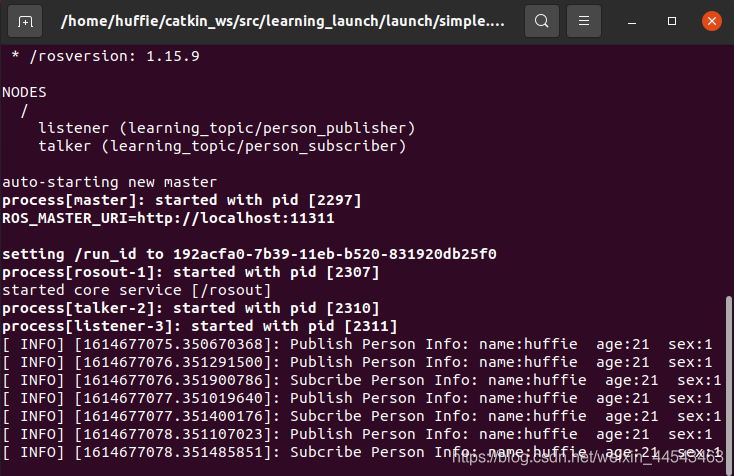
4. 运行launch文件
roslaunch learning_launch simple.launch可以看到两个节点都运行起来了。
评论