Contents
I. Purpose of Launch Files
- Configure and start multiple nodes through an XML file.
- Automatically start ROS Master at the same time (there is no need to run
roscoreseparately).
II. Launch File Syntax
1. <launch>
The root element in a launch file is defined using the <launch> tag.
2. <node>
Start a node:
<node pkg="package-name" type="executable-name" name="node-name" />- pkg: Name of the package containing the node
- type: Name of the node’s executable
- name: Name used by the node at runtime
- Other optional attributes:
- output (whether to print log information)
- respawn (whether to restart when an error occurs)
- require (whether a node is required to start)
- ns (namespace defines a namespace to avoid naming conflicts)
- args (passes arguments to each node)
3. Parameter Settings
-
<param>or<param>Set parameters in the system and store them on the parameter server.
<param name="output_frame" value="abcd"/>Load multiple parameters from a parameter file:
<rosparam file="params.yaml" command="load" ns="params" /> -
<arg>A local variable within a launch file
<arg name="arg-name" default="arg-value" />
4. Remapping <remap>
Remap ROS graph resource names.
<remap from="/turtlebot/cmd_vel" to="/cmd_vel">5. Nesting <include>
Include other launch files.
<include file="$(dirname)/other.launch">III. Launch Example
1. Create a New Package
cd ~/catkin_ws/src
catkin_create_pkg learning_launch
2. Create a launch Folder
Create a folder named launch under the learning_launch folder.
3. Create a Launch File
Create a new file in the folder you just created.
touchs simple.launchIts contents are:
<launch>
    <node pkg="learning_topic" type="person_subscriber" name="talker" output="screen" />
    <node pkg="learning_topic" type="person_publisher" name="listener" output="screen" />
</launch>
4. Run the Launch File
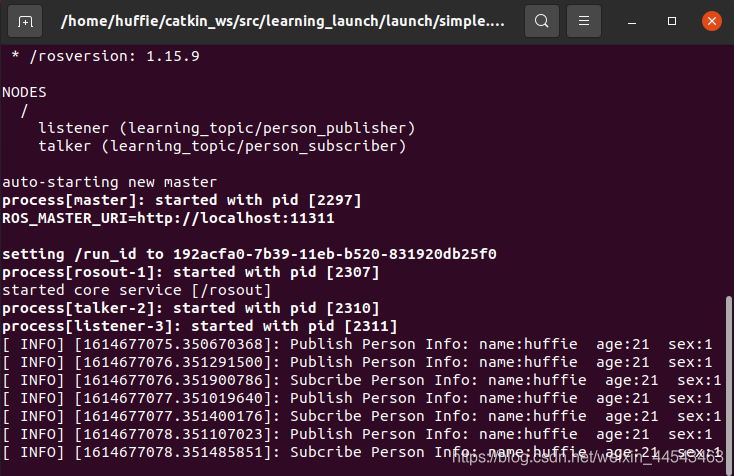
roslaunch learning_launch simple.launchBoth nodes are now running.
Comments