Contents
Abstract A brief introduction to the HDF5 data file format and its basic usage.
1 Introduction to the HDF5 Format
1.1 What Is an HDF5 File?
HDF5 is a common cross-platform data storage file format that can store different types of images and data. Files in this format can be transferred between different types of machines, and a unified function library is available for working with them.
An HDF5 file can be thought of as a container composed of multiple data objects of different types. A data object can be of any type, such as a picture, table, image, or even a document (PDF or Excel).
1.2 HDF5 File Structure
HDF5 files generally use .h5 or .hdf5 as their filename extension. Their file structure consists of two parts: Groups and Datasets.
- Group: Similar to a folder and responsible for managing data objects
- Datasets: Similar to a NumPy array; a dataset consists of metadata and the data itself
- Metadata: Metadata
- Datatype: Data type
- Dataspace: The rank and dimensions of the raw data
- Properties: How the dataset is stored in chunks and compressed
- Chunked:
- Chunked & Compressed:
- Attributes: Other custom attributes of the data
- Data Values:
- Metadata: Metadata
(1) Group
Groups manage data objects. Every HDF5 file contains a root group, which contains other groups or objects linked to other files. Groups and their members are similar to files and folders. Objects in HDF5 can also be represented using paths:
/represents the root group/arepresents memberaunder the root group/a/brepresents a member under groupa, whereais a member under the root group/
(2) Datasets
A dataset consists of metadata and the data itself.
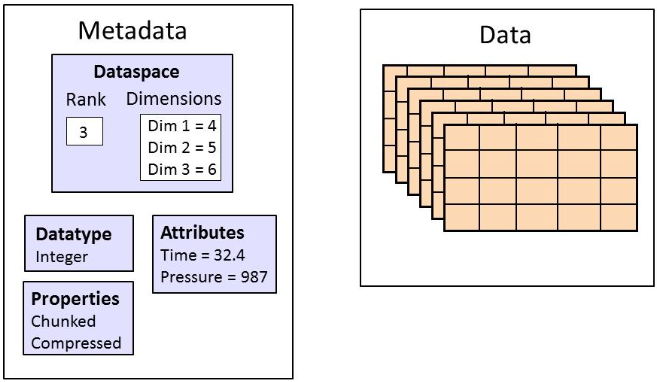
The Metadata consists of the following parts: datatype, dataspace, property, and attribute.
(3) Datatype
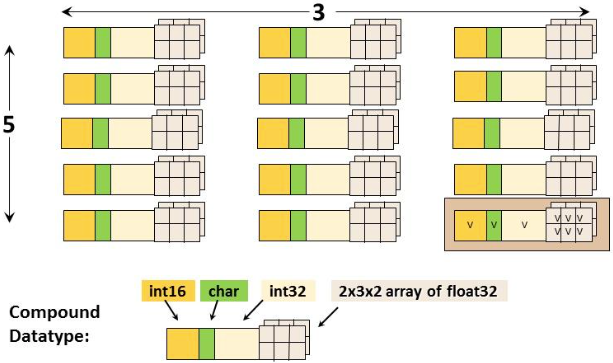
A datatype describes the data type of the elements in a dataset, such as float.
- Built-in datatypes: Includes standard datatypes and native datatypes
- Derived datatypes: For example, a compound datatype composed of a 16-bit integer, 1 character, and a 2x3x2 floating-point array
(4) Dataspace
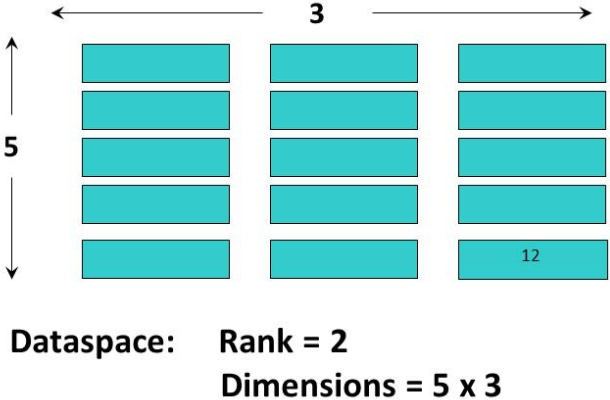
A dataspace describes how data elements are distributed within a dataset:
- Rank: The number of dimensions in the dataset (for example, the data shown below has 2 dimensions, making it a 2-dimensional array)
- Dimensions: The dimensions of the dataspace (the dataspace dimensions are 5x3)
- NULL: Indicates that the dataset contains no data elements
- Scalar: Indicates that there is only one element
- Vector: Indicates that the dataset is an array
The dimensions of a dataspace can be fixed or unlimited. Unlimited dimensions mean that the dataset size is variable (for example, an extensible dataset).
(5) Properties
HDF5 includes many default properties, which can be modified using the HDF5 Property List API.
(6) Attribute
An attribute contains a name and a value, providing additional descriptions of an HDF5 object. Attributes are usually small pieces of user-defined metadata.
II. Working with HDF5 Files in Python
(1) Using the h5py Package
import h5py(2) Creating an hdf5 File:
# 创建 hdf5文件
f = h5py.File("h5py_example.hdf5", "w")

# 在根目录`/` 下创建两个组
g1 = f.create_group("bar1")
g2 = f.create_group("bar2")

# 在根目录 `/` 下创建一个数据集(4x4的数组)
d = f.create_dataset("dset", data=np.arange(16).reshape([4, 4]))

# 为数据集添加两个属性
d.attrs["myAttr1"] = [100, 200]
d.attrs["myAttr2"] = "Hello, world!"

# 在 `bar1` 组下创建一个组和一个数据集
c1 = g1.create_group("car1")
d1 = g1.create_dataset("dset1", data=np.arange(10))

# 在 `bar2` 组下创建一个组和一个数据集
c2 = g2.create_group("car2")
d2 = g2.create_dataset("dset2", data=np.arange(10))

# 保存文件
f.close()
The resulting hdf5 file has the following structure:
+-- '/'
|   +--	group "bar1"
|   |   +-- group "car1"
|   |   |   +-- None
|   |   |
|   |   +-- dataset "dset1"
|   |
|   +-- group "bar2"
|   |   +-- group "car2"
|   |   |   +-- None
|   |   |
|   |   +-- dataset "dset2"
|   |
|   +-- dataset "dset"
|   |   +-- attribute "myAttr1"
|   |   +-- attribute "myAttr2"
|   |
|
(3) Reading an hdf5 File
# 读取 hdf5 文件
f = h5py.File("h5py_example.hdf5", "r")

# 打印 `/` 下所有的组和数据集的 keys
print(f.filename, ":")
print([key for key in f.keys()], "\n")

# 读取 `/` 下的数据集 `dset`
d = f["dset"]
print(d.name, ":")
print(d[:])

# 打印 `dset` 数据集的属性
for key in d.attrs.keys():
	print(key, ":", d.attrs[key])

# 读取组`bar1`
g = f["bar1"]

# 打印 `bar1` 下所有的组和数据集的 keys
print([key for key in g.keys()])

# 三种方式打印 `dset1` 的数据
print(f["/bar1/dset1"][:])   # 绝对路径
print(f["bar1"]["dset1"][:]) # 相对路径:file[][]
print(g['dset1'][:])         # 相对路径:g[]

# 退出文件
f.close()
References:
Comments