![[Paper Notes] ACT: Imitation Learning for Bimanual Manipulation with Low-Cost Hardware](https://img.mahaofei.com/img/202401051028504.png)
Contents
- I. Paper Notes
- 1.1 Target Problem
- 1.2 Method
- II. Code Reproduction (act)
- 2.1 Environment Setup
- 2.2 Data Collection
- 2.3 Training
- 2.4 Evaluation
- III. Code Reproduction (act-plus-plus)
- 2.1 Environment Setup
- 2.2 Data Collection
- 2.3 Training
- 2.4 Evaluation
- III. Code Analysis
- 3.1 Training Data Format
- 3.2 Replacing the Gym Environment
I. Paper Notes
Title: Learning Fine-Grained Bimanual Manipulation with Low-Cost Hardware Chinese Title: Using Low-Cost Hardware to Learn Fine-Grained Bimanual Manipulation Author Team: Stanford University Journal/Conference: arXiv Year: 2023 Code: https://github.com/tonyzhaozh/act
1.1 Target Problem
For robots, learning fine manipulation is relatively difficult, because it involves precise force control and closed-loop visual feedback, which in turn require advanced robots, precise sensors, and accurate calibration.
Can low-cost, imprecise hardware be used to perform these fine manipulation tasks?
1.2 Method
This paper proposes a simple algorithm, ACT (Action Chunking with Transformers).
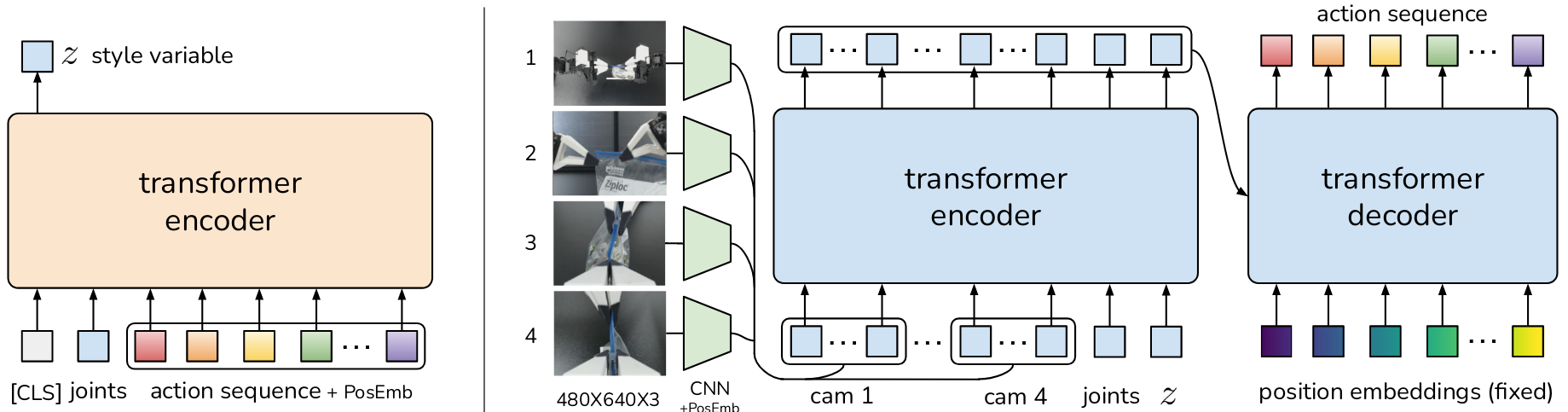
It first uses ALOHA to collect the joint positions of the leader robots from human demonstrations and treats them as actions. The observation consists of the robot’s current joint positions and the camera input images. ACT is then trained to predict a future action sequence from the current observation, that is, the target joint positions of both arms at the next time steps.
(1) Action Chunking and Temporal Ensemble
To use a pixel-to-action policy, compounding errors are addressed through adversarial imitation learning. This paper uses the idea of action chunking, grouping multiple actions together and executing them as a unit so they can be stored and executed more effectively.
This paper fixes the action-chunk size at k. Every k steps, the agent receives an observation, generates the next k actions, and executes them in sequence, so the effective horizon of the task is reduced by a factor of k.
However, the action chunks obtained this way may not be the most ideal actions, which can make the robot’s motion unstable. To improve smoothness, this paper runs the policy at every time step, producing overlapping action chunks and therefore multiple predicted actions. These predictions are exponentially weighted with , where is the weight of the oldest action, and a smaller means the merge happens faster.
(2) Modeling Human Data
Humans can solve the same task along different trajectories. Especially in regions that do not require precision, human actions can be highly random, so it is also very important for the policy to focus on high-precision regions.
This paper trains the policy as a conditional variational autoencoder (CVAE) to generate action sequences conditioned on the current observation.
- CVAE encoder: takes the current observation (robot proprioceptive state) and the action sequence as input, encodes them into a distribution over the latent variable z, parameterizes it as a Gaussian, and outputs the mean and variance of that distribution
- CVAE decoder: conditioned on z and the current observation (images + robot proprioceptive state), predicts the action sequence.
II. Code Reproduction (act)
This section follows the paper’s original repository: https://github.com/tonyzhaozh/act
2.1 Environment Setup
Create a virtual environment and install the dependencies
conda create -n aloha python=3.8.10
conda activate aloha
pip install torchvision
pip install torch
pip install pyquaternion
pip install pyyaml
pip install rospkg
pip install pexpect
pip install mujoco
pip install dm_control
pip install opencv-python
pip install matplotlib
pip install einops
pip install packaging
pip install h5py
pip install ipython
cd act/detr && pip install -e .
2.2 Data Collection
First activate the virtual environment
conda activate alohaGo to the code root directory
cd <path to act>Create two directories, one for saving the dataset and one for the trained models
mkdir -p datasets/sim_transfer_cube_scripted
mkdir checkpoints
Taking the sim_transfer_cube_scripted task as an example, use the script below to generate data for 50 episodes (you can add --onscreen_render for real-time rendering):
python3 record_sim_episodes.py --task_name sim_transfer_cube_scripted --dataset_dir datasets/sim_transfer_cube_scripted/ --num_episodes 50The 50 generated episodes are saved as 50 hdf5 files in the folder. To visualize these datasets, use the command below; here is an example that visualizes the first episode
python3 visualize_episodes.py --dataset_dir datasets/sim_transfer_cube_scripted/ --episode_idx 02.3 Training
First modify the DATA_DIR parameter in constants.py and change it to your own dataset folder name:
DATA_DIR = '/home/mahaofei/Programs/Imitation/act/datasets'Start training:
python3 imitate_episodes.py --task_name sim_transfer_cube_scripted --ckpt_dir checkpoints/ --policy_class ACT --kl_weight 10 --chunk_size 100 --hidden_dim 512 --batch_size 8 --dim_feedforward 3200 --num_epochs 2000 --lr 1e-5 --seed 0If the ACT policy is unstable within an episode or stays stuck without changing, train for longer; after the plateau, both success rate and trajectory smoothness will improve.
2.4 Evaluation
Use the same script as for training, but add --eval. The program saves evaluation videos to the checkpoints folder. You can also add --onscreen_render for real-time rendering during evaluation.
python3 imitate_episodes.py --task_name sim_transfer_cube_scripted --ckpt_dir checkpoints/ --policy_class ACT --kl_weight 10 --chunk_size 100 --hidden_dim 512 --batch_size 8 --dim_feedforward 3200 --num_epochs 2000 --lr 1e-5 --seed 0 --eval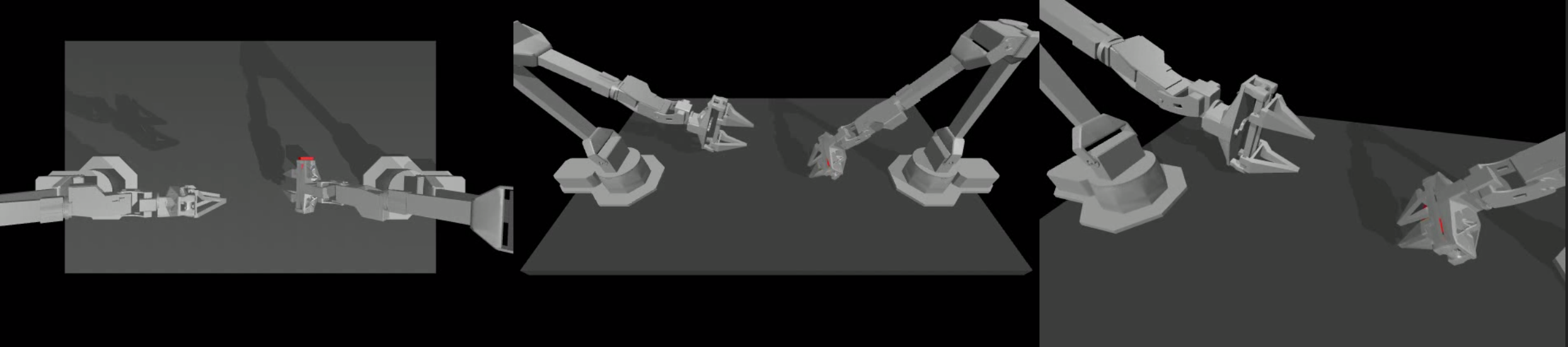
In testing, the actual success rate was not high: misalignment kept occurring during grasping, and the transfer process rarely succeeded.
The cause was still unknown at the time; awaiting further investigation. The cause has been identified: a specific version of mujoco is required; see issue #12
pip install mojoco==2.3.7 dm_env==1.6 dm_control==1.0.14III. Code Reproduction (act-plus-plus)
I recently found that in a new paper, Mobile ALOHA Learning Bimanual Mobile Manipulation with Low-Cost Whole-Body Teleoperation, the authors updated the ACT algorithm. The overall reproduction flow is the same, with some modifications.
This section follows the paper’s original repository: https://github.com/MarkFzp/act-plus-plus
2.1 Environment Setup
Download the source code
git clone https://github.com/MarkFzp/act-plus-plusCreate a virtual environment and install the dependencies
conda create -n act python=3.8.10
conda activate act
pip install torchvision
pip install torch
pip install pyquaternion
pip install pyyaml
pip install rospkg
pip install pexpect
pip install mujoco==2.3.7
pip install dm_control==1.0.14
pip install dm_env==1.6
pip install opencv-python
pip install matplotlib
pip install einops
pip install packaging
pip install h5py
pip install ipython
cd act-plus-plus/detr && pip install -e .
Libraries that are not mentioned but are still imported include
pip install diffusers
pip install wandb

git clone git@github.com:ARISE-Initiative/robomimic.git
cd robomimic
git checkout diffusion-policy-mg
pip install -e .
Modify the DATA_DIR parameter in constants.py and change it to your own dataset folder name:
DATA_DIR = '/home/mahaofei/Programs/Imitation/act/datasets'Create an account on the wandb website, create a project, and change line 148 of imitate_episodes.py to:
wandb.init(project="项目名称", reinit=True, entity="wandb用户名", name=expr_name)As of 2023-01-05, the open-source code still had some issues; change line 285 of detr/models/detr_vae.py to encoder = build_encoder(args). See the issue
2.2 Data Collection
First activate the virtual environment
conda activate actGo to the code root directory
cd <path to act>Create two directories, one for saving the dataset and one for the trained models
mkdir -p datasets/sim_transfer_cube_scripted
mkdir checkpoints
Collect data: Taking the sim_transfer_cube_scripted task as an example, use the script below to generate data for 50 episodes (you can add --onscreen_render for real-time rendering):
python3 record_sim_episodes.py --task_name sim_transfer_cube_scripted --dataset_dir datasets/sim_transfer_cube_scripted/ --num_episodes 50Visualize the collected data: The 50 generated episodes are saved as 50 hdf5 files in the folder. To visualize these datasets, use the command below; here is an example that visualizes the first episode
python3 visualize_episodes.py --dataset_dir datasets/sim_transfer_cube_scripted/ --episode_idx 02.3 Training
Start training:
python3 imitate_episodes.py --task_name sim_transfer_cube_scripted --ckpt_dir checkpoints/ --policy_class ACT --kl_weight 10 --chunk_size 100 --hidden_dim 512 --batch_size 4 --dim_feedforward 3200 --num_steps 2000 --lr 1e-5 --seed 0If you run out of GPU memory (CUDA out of memory), reduce batch_size.
If the ACT policy is unstable within an episode or stays stuck without changing, train for longer; after the plateau, both success rate and trajectory smoothness will improve.
2.4 Evaluation
Use the same script as for training, but add --eval. The program saves evaluation videos to the checkpoints folder. You can also add --onscreen_render for real-time rendering during evaluation.
python3 imitate_episodes.py --task_name sim_transfer_cube_scripted --ckpt_dir checkpoints/ --policy_class ACT --kl_weight 10 --chunk_size 100 --hidden_dim 512 --batch_size 8 --dim_feedforward 3200 --num_steps 10000 --lr 1e-5 --seed 0 --eval --onscreen_renderIII. Code Analysis
3.1 Training Data Format
ACT training data is generated as multiple hdf5 files, each corresponding to one demonstration. The structure of each hdf5 file is as follows:
- episode_1.hdf5
- action: dataset data storing the robot actions, shape (400, 14), including end-effector position and quaternion, and normalized gripper position (0 closed, 1 open) [left_arm_qpos (6), left_gripper_positions (1), right_arm_qpos (6), right_gripper_positions (1),],
- observations: group storing observation data
- images: group storing image data
- left_wrist: dataset storing left robot wrist-camera image data, shape (400, 480, 640, 3), i.e., length 400, each image of size (480, 640, 3).
- right_wrist: dataset storing right robot wrist-camera image data, shape (400, 480, 640, 3), i.e., length 400, each image of size (480, 640, 3).
- top: dataset storing top-camera image data, shape (400, 480, 640, 3), i.e., length 400, each image of size (480, 640, 3).
- qpos: dataset, shape (400, 14), including absolute joint positions and normalized gripper position (0 closed, 1 open) [left_arm_qpos (6), left_gripper_position (1), right_arm_qpos (6), right_gripper_qpos (1)]
- qvel: dataset, shape (400, 14), including absolute joint velocities (rad) and normalized gripper velocity (positive means opening, negative means closing) [left_arm_qvel (6), left_gripper_velocity (1), right_arm_qvel (6), right_gripper_qvel (1)]
- images: group storing image data
3.2 Replacing the Gym Environment
(1) Add dependencies
pip install gym==0.12.1
pip install "cython<3"
pip install perlin_noise
(2) Write a script to generate HDF5 data in the same format as ACT training data
(3) Train
Comments