Contents
- Introduction
- 1.1 Localization Methods
- 1.2 Cameras
- Classic SLAM Framework
- 2.1 Sensor Data Reading
- 2.2 Frontend Visual Odometry
- 2.3 Backend Optimization
- 2.4 Loop Closure Detection
- 2.5 Mapping
- Mathematical Formulation of the SLAM Problem
- 3.1 Motion Equation — Localization Problem
- 3.2 Observation Equation — Mapping Problem
- 3.3 Methods for Solving the Equations
- Linux Basics
- 4.1 Writing the Hello SLAM Program
- 4.2 Using cmake
- 4.3 Using Libraries
SLAM Notes Column: https://blog.csdn.net/weixin_44543463/category_10925276.html
Introduction
For a mobile robot, we often need it to know two things:
- Where am I — localization
- What does the surrounding environment look like — mapping
1.1 Localization Methods
For localization, there are many ways for a robot to determine its position. They fall into two main categories:
- Carried on the robot body: wheel encoders, cameras, lasers, and so on
- Installed in the environment: guide lines, QR codes, and so on
Devices installed in the environment constrain the external environment, impose high requirements on the environment, and cannot provide a general, universal solution. Sensors carried on the robot body, on the other hand, can be used in unknown environments.
In visual SLAM, we focus more on how to use cameras to solve localization and mapping problems.
1.2 Cameras
Cameras can be divided into three categories by how they work.
Monocular camera: uses only one camera for SLAM. It acquires data as a series of photos. Photos reflect the three-dimensional world in two dimensions, so in a single image, you cannot determine an object’s true size or its distance. If we want to recover three-dimensional structure, we must move the camera viewpoint.
Stereo camera: uses two cameras for measurement. This removes the scale uncertainty of a monocular camera and can measure object size. The larger the baseline between the two cameras, the farther the measurement range. Its drawbacks are that configuration and calibration are very complex and consume a lot of computing resources.
Depth camera: through infrared structured light or ToF principles, actively emits light toward objects and receives the returned light to measure the distance from the object to the camera. It measures through physical means, saving a large amount of computation, but its drawbacks are a narrow measurement range, high noise, a small career, susceptibility to sunlight interference, and inability to measure projected materials.
Classic SLAM Framework
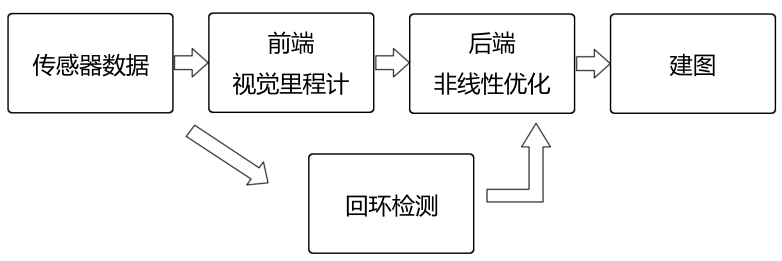
2.1 Sensor Data Reading
Sensor data reading is mainly about reading and preprocessing image information; it may also include reading and synchronizing horse disks, inertial sensors, and other information.
2.2 Frontend Visual Odometry
The task of visual odometry is to estimate camera motion between consecutive images. Because it estimates camera motion between pairs of images and chains them together to obtain the robot trajectory, trajectory estimates from visual odometry alone inevitably suffer from accumulated error. To address this, we have backend optimization and loop closure detection.
2.3 Backend Optimization
The task of backend optimization is to take camera poses measured by visual odometry, combine innovations from loop closure detection, and obtain a globally consistent trajectory and map. Backend optimization mainly deals with noise in the SLAM process, using filtering and nonlinear optimization algorithms, among others.
2.4 Loop Closure Detection
The goal is to determine whether the robot has previously visited a location. It mainly addresses position drift over time.
2.5 Mapping
Based on the estimated trajectory, establish at a map corresponding to the task requirements. Maps mainly take two forms:
- Metric map: classified into sparse and dense categories. Sparse maps abstract to some degree and can satisfy localization needs. For navigation, we need dense maps. Dense maps are represented by small blocks or cells; each cell has one of three states—occupied, free, or unknown. This kind of map can be used in various navigation algorithms.
- Topological map: consists only of nodes and edges, considering only connectivity between nodes. It drops detail and is a more compact representation, but cannot express maps with complex structure.
Mathematical Formulation of the SLAM Problem
When a robot carrying sensors moves in an unknown environment, the camera collects a series of data at discrete time steps.
3.1 Motion Equation — Localization Problem
The robot’s position at these discrete times is denoted by . Because sensors differ, there is no fixed equation for the robot’s position at a given moment, but we know that the position at each time step depends on the position at the previous time step and the data collected by the sensors.

where is the sensor reading and is noise.
3.2 Observation Equation — Mapping Problem
Suppose the map consists of multiple landmarks. At each time step the sensor measures a subset of landmarks and obtains observation data for those points. That is, at position the robot measures landmark and produces observation data .

where is observation noise.
3.3 Methods for Solving the Equations
Depending on whether the motion and observation equations are linear, systems are classified as linear/nonlinear systems. Depending on whether noise follows a Gaussian distribution, they are classified as Gaussian/non-Gaussian systems.
- For linear Gaussian systems, unbiased optimal estimation can be given by the Kalman filter.
- For complex nonlinear non-Gaussian systems, extended Kalman filtering and nonlinear optimization are used.
Linux Basics
4.1 Writing the Hello SLAM Program
Create the folder /slam/ch01 in the root directory.
Use vim, gedit, nano, or another editor, enter the following code, and save it as helloSLAM.cpp
#include <iostream>
using namespace std;

int main()
{
	cout << "Hello SLAM!" << endl;
	return 0;
}
4.2 Using cmake
Still in this directory, create a file CMakeLists.txt with the following content
#声明要求的cmake最低版本
cmake_minimum_required( VERSION 2.8 )

#声明一个cmake工程
project( HelloSLAM )

#添加一个可执行程序	语法:add_executable( 可执行程序名 源代码文件名 )
add_executable( helloSLAM helloSLAM.cpp )
Create a folder with mkdir build to store intermediate files generated by mutation.
Enter the build folder and compile with the following commands
cmake ..
make
This produces an executable named helloSLAM. Run ./helloSLAM to execute the program and see the correct output.
4.3 Using Libraries
In C++, only files containing a main function generate executables; for other code, we only need to package it into a library for programs to call.
(1) Create a Library
In the ch01 folder from earlier, create a file named libHelloSLAM.cpp
#include <iostream>
using namespace std;
void printHello()
{
	cout << "Hello SLAM!!" << endl;
}
This library file provides a printHello function, but it has no main function, so it will not produce an executable. We need to tell cmake we want to compile this file into a library named “hello”. Add to CMakeLists.txt:
add_library(hello_shared SHARED libHelloSLAM.cpp)Here we create a shared library. In Linux, library files are divided into static libraries and dynamic libraries. Static libraries have a .a suffix; each time they are called, a copy is generated. Shared libraries have a .so suffix; there is only one copy, which saves space.
At this point, after compiling, you can obtain a library file libhello_shared.so.
(2) Create a Header File
Create a file named libHelloSLAM.cpp
#ifndef LIBHELLOSLAM_H_
#define LIBHELLOSLAM_H_
void printHello();
#endif
(3) Create the Main Program
Create a file named useHello.cpp
#include "libHelloSLAM.h"
int main()
{
	printHello();
	return 0;
}
Add to CMakeLists.txt the command to build the executable and link it to the library we just used.
add_executable( useHello useHello.cpp )
target_link_libraries( useHello hello_shared )
Compile to obtain the executable useHello.
Comments