References
Preface
I had been using Mujoco before, and for certain reasons I am now switching to Isaac Sim. I am just getting started, and this post records some notes from exploring robot simulation in Isaac Sim, for reference.
This post implements robotic arm inverse kinematics control. The examples include joint control routines that are very simple, but when I wanted Cartesian-space control, I searched the documentation and found ArticulationKinematicsSolver🔗, but its parameters require passing in a kinematics_solver instance object, so I also found KinematicsSolver🔗, and learned that I first need to create a Lula Kinematics Solver. This article implements robotic arm inverse kinematics control based on the Lula Kinematics Solver.
Prerequisites
- Isaac Sim 4.5.0 WorkStation edition must be installed (the Python version of Isaac Sim seems to lack certain features; there is no 【Tool-Robotics-Lula Robot Description Editor】)
- You already have the robotic arm’s
urdfandusdmodels
1. Creating a Lula Robot Description
The Lula Kinematics Solver documentation explains that configuring the Lula Kinematics Solver requires robot_descriptor.yaml and the robot urdf files. You surely already have the urdf; this section starts with creating robot_descriptor.yaml using Isaac Sim’s Robot Description Editor.
Using the UR + dexterous hand in this article as an example, there are 6+6=12 controllable joints in total, but Lula focuses on moving the robot to a specified position and does not involve the end effector, so only the UR’s 6 joints are treated as active joints, with dexterous hand joints considered fixed joints.
(1) Open Lula Robot Description Editor
Start Isaac Sim:
cd ~/isaacsim
./isaac-sim.sh
Drag the robot USD file into the World coordinate frame.
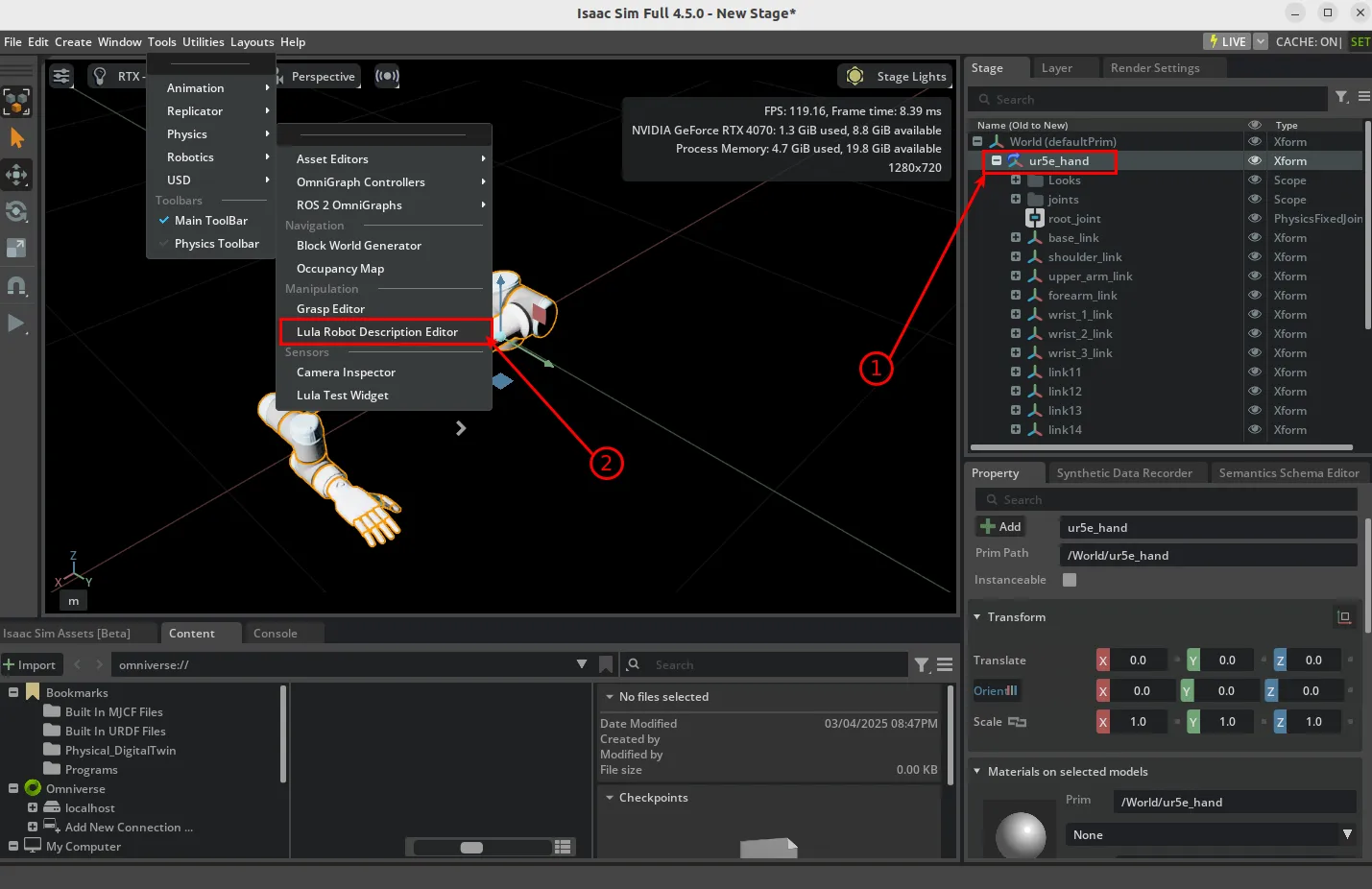
Open【Tools -> Robotics -> Lula Robot Description Editor】, and you will see the Lula Robot Description Editor panel appear on the left side of the window.
Then click the【Play】button. A【Selection Panel】will appear in the Lula Robot Description Editor. Under Select Articulation, choose your robot, and a Set Joint Properties panel will expand below.
(2) Set joint properties
Following the UR robot’s active joints, set all 6 Joint Status entries to Active Joint. You can leave the default joint positions, acceleration limits, and other settings unchanged for now; you can adjust them later once you are familiar with what each parameter means.
Set all joints belonging to the dexterous hand/gripper to Fixed Joint.
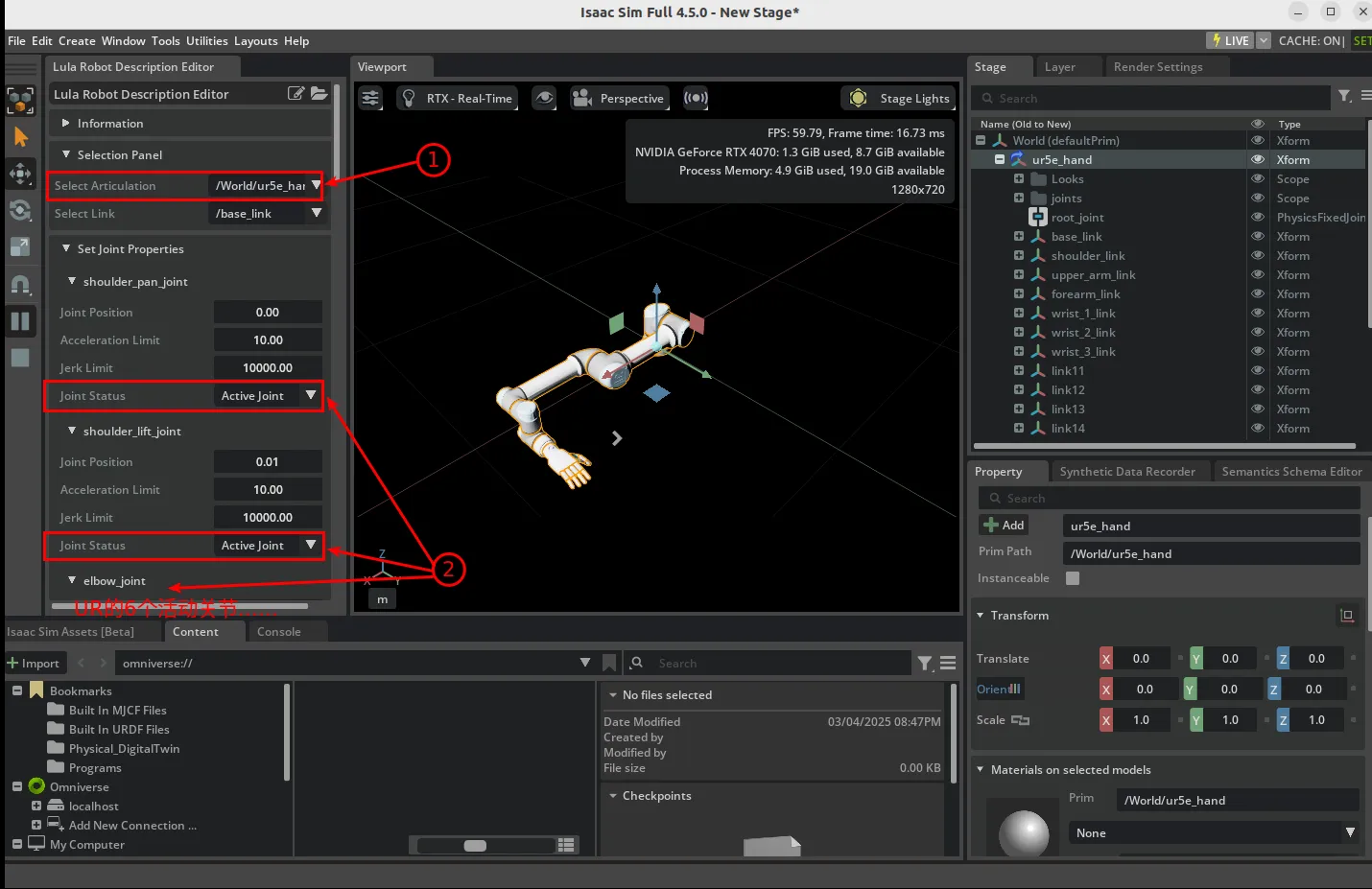
(3) Collision spheres (can be skipped for kinematics only)
You need to add collision spheres to the Robot Description file before you can use RMPFlow motion planning and similar features. See Adding Collision Spheres for details. In theory, for a six-DOF robotic arm, adding collision spheres for Link2 and Link4 is sufficient.
Complete all of this in the Lula Robot Description Editor.
- First, under【Selection Panel-Select Link】, choose Link2.
- Then, under【Link Sphere Editor-Add Sphere】, add a collision sphere. You can drag it into position and adjust the radius in the properties panel at the lower right until it fully covers the current link.
Repeat the process to add collision spheres for Link4. The result looks like this:
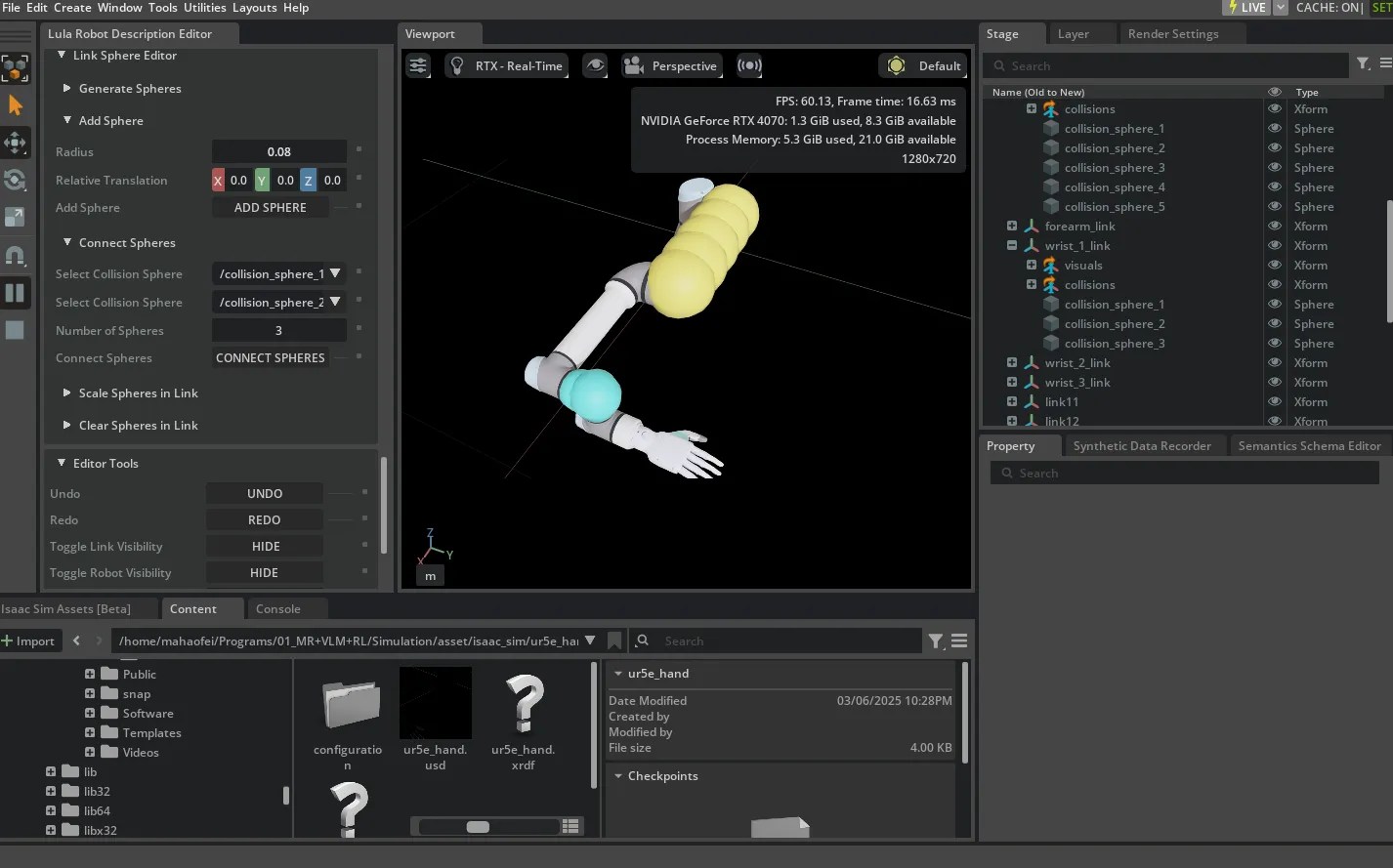
(4) Export configuration files
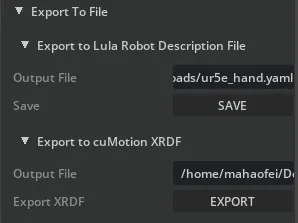
Save the Lula Robot Description file: under【Export To File -> Export to Lula Robot Description File】, enter a local path (must end with .yaml), for example/home/mahaofei/Downloads/ur5e_hand.yaml, and the YAML file will be saved at the target location.
Save the XRDF file: although I do not know what it is for, the save method is the same.
2. Cartesian-space motion control code
Reference code: sets the robot’s Cartesian-space position to position: [0.5, 0, 0.5], orientation: [0, 0, 0].
import sys
import numpy as np
import argparse
from typing import Optional

# Isaac Sim 相关依赖库
from isaacsim import SimulationApp
simulation_app = SimulationApp({"headless": False})  # start the simulation app, with GUI open
from isaacsim.core.api import World
from isaacsim.core.prims import Articulation
from isaacsim.core.utils.stage import add_reference_to_stage, get_stage_units
from isaacsim.core.utils.viewports import set_camera_view
from isaacsim.storage.native import get_assets_root_path
from isaacsim.robot_motion.motion_generation import ArticulationKinematicsSolver, LulaKinematicsSolver
from isaacsim.core.utils.numpy.rotations import euler_angles_to_quats

from isaacsim.core.utils.types import ArticulationAction
from isaacsim.robot.manipulators.manipulators import SingleManipulator
import isaacsim.core.api.tasks as tasks

class KinematicsSolver(ArticulationKinematicsSolver):
    def __init__(self, robot_articulation: Articulation, end_effector_frame_name: Optional[str] = None) -> None:
        #TODO: change the config path
        self._kinematics = LulaKinematicsSolver(robot_description_path="asset/isaac_sim/ur5e_hand/ur5e_hand.yaml",
                                                urdf_path="asset/urdf_ros2/ur5e_hand/urdf/ur5e_hand.urdf")
        if end_effector_frame_name is None:
            end_effector_frame_name = "wrist_3_link"
        ArticulationKinematicsSolver.__init__(self, robot_articulation, self._kinematics, end_effector_frame_name)
        return

# 1. 创建一个World对象
world = World(stage_units_in_meters=1.0)
world.initialize_physics()
world.scene.add_default_ground_plane()
set_camera_view(
    eye=[2.0, 1.5, 1.8], target=[0.00, 0.00, 0.81], camera_prim_path="/OmniverseKit_Persp"
)

# 2. 添加一个UR5e机器人
add_reference_to_stage(usd_path="asset/isaac_sim/ur5e_hand/ur5e_hand.usd", prim_path="/World/ur5e_hand")
ur5e_hand = SingleManipulator(
    prim_path="/World/ur5e_hand",
    name="ur5e_hand",
    end_effector_prim_path="/World/ur5e_hand/wrist_3_link")
init_joint_positions=np.array([0.0, -np.pi/2, np.pi/2, 0.0, 0.0, 0.0, 0.0, 0.0, 0.0, 0.0, 0.0, 0.0, 0.0, 0.0, 0.0, 0.0, 0.0, 0.0])
ur5e_hand.set_joints_default_state([init_joint_positions])
ur5e_hand.initialize()
ur5e_hand.post_reset()
world.scene.add(ur5e_hand)

# 3. 设置逆运动学求解器
controller = KinematicsSolver(ur5e_hand)
articulation_controller = ur5e_hand.get_articulation_controller()

# 4. 控制机器人运动
while simulation_app.is_running():
    world.step(render=True)
    if world.is_playing():
        if world.current_time_step_index == 0:
            world.reset()
        actions, succ = controller.compute_inverse_kinematics(
            target_position=np.array([0.5, 0, 0.5]),
            target_orientation=euler_angles_to_quats(np.array([0, 0, 0])),
        )
        if succ:
            articulation_controller.apply_action(actions)
        else:
            print("IK did not converge to a solution.  No action is being taken.")
simulation_app.close()
Comments