Contents
I. Read and Write Operations
1.1 Array Traversal
Since an image is essentially a Mat matrix, its pixels can be read and written by using array traversal to access every element in the Mat matrix. Note, however, that grayscale and color images have different numbers of channels: grayscale images have one channel, while color images have three channels. Reading and writing pixels therefore involves two cases: reading and writing grayscale-image pixels, and reading and writing color-image pixels.
① Reading and writing grayscale-image pixels
Each pixel in a grayscale image corresponds to one value in the Mat matrix, so accessing a grayscale-image pixel is equivalent to accessing an element of the Mat matrix. The syntax is as follows:
//读灰度图像素
int pv = image.at<uchar>(row, col);
//写灰度图像素(反转颜色)
image.at<uchar>(row, col) = 255 - pv;
Since each grayscale-image pixel occupies 1 byte (0-255), uchar is used. Here, row represents the number of rows in the Mat matrix, and col represents the number of columns.
② Reading and writing color images
Each pixel in a color image corresponds to three values in the Mat matrix. The access method is similar to that for a grayscale image.
//读彩色图像素
Vec3b bgr = image.at<Vec3b>(row, col);
//写彩色图像素(反转颜色)
image.at<Vec3b>(row, col)[0] = 255 - bgr[0];
image.at<Vec3b>(row, col)[1] = 255 - bgr[1];
image.at<Vec3b>(row, col)[2] = 255 - bgr[2];
Because accessing a color-image pixel requires reading three values at once, we use the Vec3b structure (which can be viewed as an array). The three values obtained through the access can be stored directly in a variable defined with the Vec3b structure. If the values of color-image pixels are integers, Vec3i must be used; if they are floating-point values, vec3f must be used.
③ Example program
void MyDemo::pixelVisit_Demo(Mat& image) {
	int w = image.cols;
	int h = image.rows;
	int dims = image.channels();
	for (int row = 0; row < h; row++) {
		for (int col = 0; col < w; col++) {

			//灰度图像
			if (dims == 1) {
				int pv = image.at<uchar>(row, col);
				image.at<uchar>(row, col) = 255 - pv;
			}

			//彩色图像
			if (dims == 3) {
				Vec3b bgr = image.at<Vec3b>(row, col);
				image.at<Vec3b>(row, col)[0] = 255 - bgr[0];
				image.at<Vec3b>(row, col)[1] = 255 - bgr[1];
				image.at<Vec3b>(row, col)[2] = 255 - bgr[2];
			}
		}
	}
	imshow("Pixel Visit Demo", image);
}
1.2 Pointer Traversal
The principle of pointer traversal is similar to that of array traversal. Define a pointer to the start address of the current row, and then use this pointer to traverse and access all pixels in that row.
void MyDemo::pixelVisit_Demo(Mat& image) {
	int w = image.cols;
	int h = image.rows;
	int dims = image.channels();
	for (int row = 0; row < h; row++) {
		uchar* current_row = image.ptr<uchar>(row);
		for (int col = 0; col < w; col++) {

			//灰度图像
			if (dims == 1) {
				*current_row++ = 255 - *current_row;
			}

			//彩色图像
			if (dims == 3) {
				*current_row++ = 255 - *current_row;
				*current_row++ = 255 - *current_row;
				*current_row++ = 255 - *current_row;
			}
		}
	}
	imshow("Pixel Visit Demo", image);
}
Here, current_row points to the start address of each row as the loop progresses.
*current_row++ = 255 - *current_row; means inverting the color of the value pointed to by current_row (a pixel in a grayscale image or one channel of a pixel in a color image), then incrementing the pointer by +1 so that it points to the next pixel or the next channel of the pixel.
II. Arithmetic Operations
2.1 Pixels
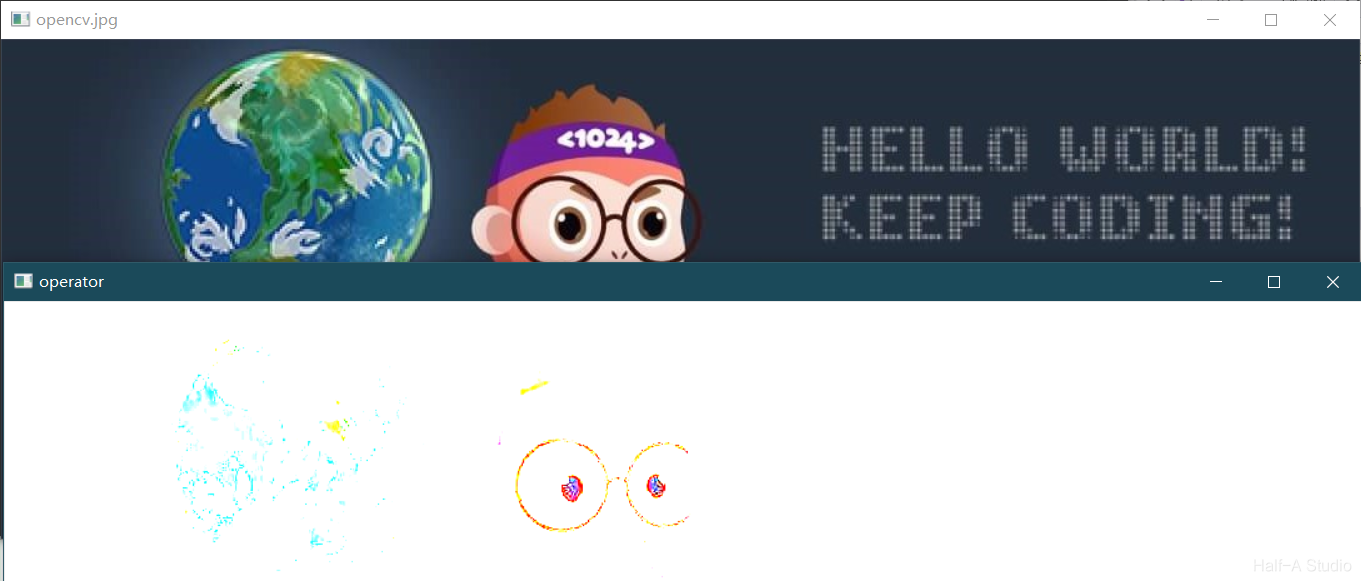
Addition, subtraction, multiplication, and division can be performed directly on the Mat matrix of an image (note that addition for a color image requires Scalar). The result of addition/subtraction is an increase/decrease in image brightness, and the same applies to multiplication/division. However, processing may cause pixel values to exceed the range (0~255); the saturate_cast function can be used for clipping.
//image * m -> dst
void MyDemo::operators_Demo(Mat& image) {
	Mat m = Mat::zeros(image.size(), image.type());
	m = Scalar(20, 20, 20);
	Mat dst = Mat::zeros(image.size(), image.type());

	int w = image.cols;
	int h = image.rows;
	int dims = image.channels();

	for (int row = 0; row < h; row++) {
		for (int col = 0; col < w; col++) {

			//灰度图像
			if (dims == 1) {
				int pv = image.at<uchar>(row, col);
				image.at<uchar>(row, col) = 255 - pv;
			}

			//彩色图像
			if (dims == 3) {
				Vec3b p1 = image.at<Vec3b>(row, col);
				Vec3b p2 = m.at<Vec3b>(row, col);
				dst.at<Vec3b>(row, col)[0] = saturate_cast<uchar>(p1[0] * p2[0]);
				dst.at<Vec3b>(row, col)[1] = saturate_cast<uchar>(p1[1] * p2[1]);
				dst.at<Vec3b>(row, col)[2] = saturate_cast<uchar>(p1[2] * p2[2]);
			}
		}
	}
	imshow("operator",dst);
}
2.2 Image Arithmetic Operation APIs
| Operation | Function |
|---|---|
| Addition | add(img1, img2, imgout); |
| Subtraction | subtract(img1, img2, imgout); |
| Multiplication | multiply(img1, img2, imgout); |
| Division | divide(img1, img2, imgout); |
void MyDemo::operators_Demo(Mat& image) {
	Mat dst = Mat::zeros(image.size(), image.type());
	Mat m = Mat::zeros(image.size(), image.type());
	m = Scalar(20, 20, 20);

	//add(image, m, dst);
	//subtract(image, m, dst);
	multiply(image, m, dst);
	//divide(image, m, dst);

	imshow("operator",dst);

}
III. Logical Operations
3.1 Basics—Truth Table
| A | B | AND | OR | XOR |
|---|---|---|---|---|
| 0 | 0 | 0 | 0 | 0 |
| 1 | 0 | 0 | 1 | 1 |
| 0 | 1 | 0 | 1 | 1 |
| 1 | 1 | 1 | 1 | 0 |
3.2 Draw a Rectangle
To display the results of pixel-level logical operations more intuitively, we can draw two rectangles and perform logical operations on their intersecting region. Drawing a rectangle is very simple: first create a blank image, then call the rectangle function.
rectangle(m1, Rect(50, 50, 80, 80), Scalar(255, 255, 0), -1, LINE_8, 0);
rectangle(被处理图像, 左上点坐标, 颜色, 线宽, 线型, 坐标点的小数点位数);
The example program is as follows:
void MyDemo::bitWise_Demo(Mat& image) {
	Mat m1 = Mat::zeros(Size(256, 256), CV_8UC3);
	Mat m2 = Mat::zeros(Size(256, 256), CV_8UC3);
	rectangle(m1, Rect(50, 50, 80, 80), Scalar(255, 255, 0), -1, LINE_8, 0);
	rectangle(m2, Rect(100, 100, 80, 80), Scalar(0, 255, 255), -1, LINE_8, 0);
	imshow("m1", m1);
	imshow("m2", m2);
}
3.3 Logical Operations
| Operation | Function |
|---|---|
| AND | bitwise_and(m1, m2, dst); |
| OR | bitwise_or(m1, m2, dst); |
| NOT | bitwise_not(m1, dst); |
| XOR | bitwise_xor(m1, m2, dst); |
Taking the “AND” operation as an example, the test code is as follows:
void MyDemo::bitWise_Demo(Mat& image) {
	Mat m1 = Mat::zeros(Size(256, 256), CV_8UC3);
	Mat m2 = Mat::zeros(Size(256, 256), CV_8UC3);
	rectangle(m1, Rect(50, 50, 80, 80), Scalar(255, 255, 0), -1, LINE_8, 0);
	rectangle(m2, Rect(100, 100, 80, 80), Scalar(0, 255, 255), -1, LINE_8, 0);
	imshow("m1", m1);
	imshow("m2", m2);
	Mat dst;
	bitwise_and(m1, m2, dst);
	imshow("bitWise", dst);
}| Region | Color |
|---|---|
| Background | Scalar(0, 0, 0) |
| Rectangle 1 | Scalar(255, 255, 0) |
| Rectangle 2 | Scalar(0, 255, 255) |
| Intersecting region | Scalar(0, 255, 0) |
| Other regions | Scalar(0, 0, 0) |
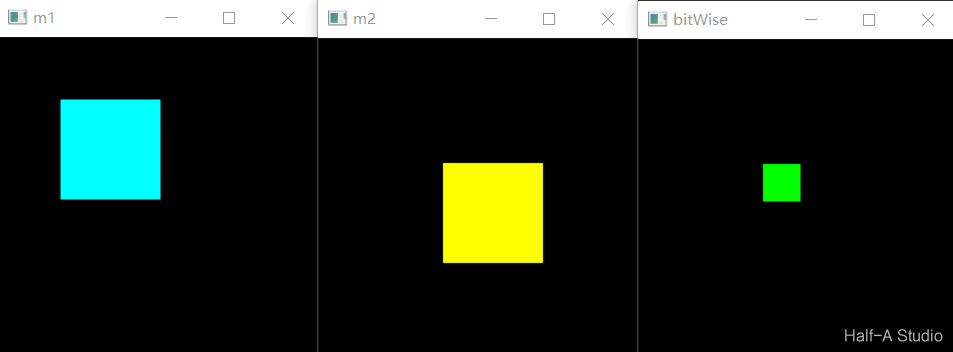
The other “OR,” “NOT,” and “XOR” operations are similar. Those interested can try them on their own.
Comments