
Contents
Installing the PCL Library on Ubuntu 20.04
Recommended installation method:
sudo apt install libpcl*If you do not need the latest PCL features, this is fine for everyday point cloud processing and visualization.
Source installation (cmake-gui recommended):
Download PCL-1.10. Be sure to use version 1.10, because the ROS installation process installs the pcl-1.10 libraries. That works fine for normal use, but it lacks some newer features such as pcl/surface/on_nurbs. I wanted to use that module, so I built from source. If you install another version, you may run into conflicts such as error: redefinition of
cd pcl-pcl-1.10
mkdir build && cd build
cmake-gui
Set the source code directory to the downloaded and extracted pcl-pcl-1.10 folder, and set the second path to the build folder you just created.
Click Configure, then Finish. Some initial configuration options appear.
Make sure to enable BUILD_surface_on_nurbs; otherwise you will get an error like pcl/surface/on_nurbs/fitting_surface_tdm.h: 没有那个文件或目录. It is best to enable everything you can. In addition to the defaults, I also checked:
- BUILD_CUDA
- BUILD_GPU
- BUILD_examples
- BUILD_simulation
- BUILD_surface_on_nurbs
- BUILD_kinfu_tools
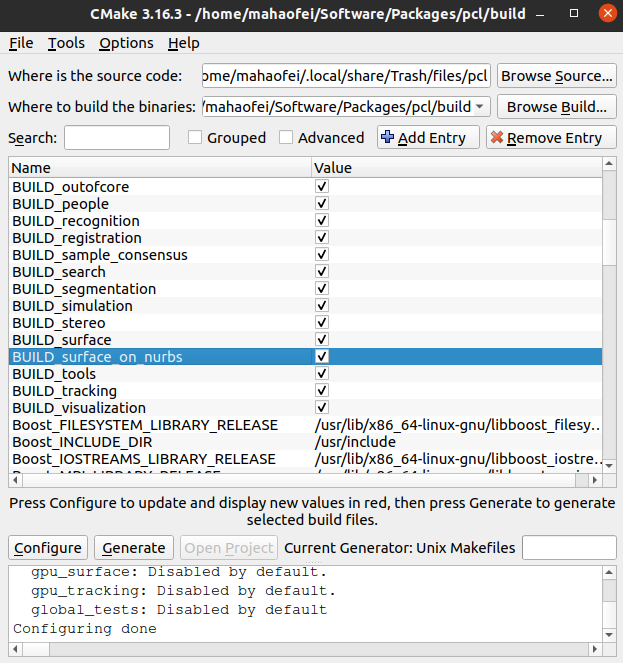
Once there are no red-highlighted areas left, click configure. After configuration completes, click the generate button. This creates project files in the build folder. Then you can close the cmake-gui window.
make
# 或者使用make -j4,make -j8,后面的数字为同时使用的线程数,量力而行,线程过多可能会系统直接卡死
sudo make install
Uninstalling a source build
sudo updatedb
locate pcl-1.13 #查看pcl-1.13的位置
sudo rm -r /usr/local/include/pcl-1.13 /usr/local/share/pcl-1.13
sudo updatedb
locate pcl-1.13 #检查是否全部删除
Basic PCL Usage
1. Basic Data Types
- Point:
pcl::PointXYZ,pcl::PointXYZRGB,pcl::PointXYZI - Point cloud:
pcl::PointCloud- Width and height:
PointCloud::widthandPointCloud::height, both of typeint. For regularly arranged point clouds, these represent the width and height of the cloud. For unordered clouds, the height is 1 and the width is the number of points. - Points:
PointCloud::pointsstores the points in a vector. - Pointer:
PointCloud::Ptris a smart pointer toPointCloud.
- Width and height:
2. Reading and Writing Point Cloud Data
Reading a point cloud
pcl::PCDReader pcd_reader;
pcd_reader.read("xxx.pcd", *cloud);
// 或
pcl::io::loadPCDFile<pcl::PointXYZ>("xxx.pcd", *cloud);
Saving a point cloud
pcd_writer.write<pcl::PointXYZ>("xxx.pcd", *cloud, false);  //false表示保存为ASCII文件
// 或
pcl::io::savePCDFileASCII("xxx.pcd", *cloud);
3. Point Cloud Filtering
Pass-through filter: Set the distance range to keep along the x, y, and z axes directly, and remove points outside that range.
pcl::passThrough<pcl::PointXYZ> pass;
pass.setInputCloud(cloud);
pass.setFilterFieldName("x\y\z");
pass.setFileterLimits(0.0, 3.0);
pass.filter(*output_cloud);
Voxel grid filter: Divide space into grids of a fixed volume, replace all points in each grid with the centroid of the points in that grid, and compress each grid to a single centroid point.
pcl::VoxelGrid<pcl::PointXYZ> vg;
vg.setInputCloud(cloud);
vg.setLeafSize(0.01f, 0.01f, 0.01f);  // 网格的长宽高
vg.filter(*output_cloud)
Statistical outlier removal: Compute the mean distance from each point to its nearest neighbors. If the mean distance exceeds the configured threshold, the point is treated as an outlier and removed.
pcl::StatisticalOutlierRemoval<pcl::PointXYZ> sor;
sor.setInputCloud(cloud);
sor.setMeanK(50);  //设置参与计算平均距离的点数
sor.setStddevMulThresh(0.1);  //设置平均距离的阈值(米)
sor.filter(*cloud_filtered);
Radius outlier removal: Remove points that have fewer than the configured number of neighbors within a given radius.
pcl::RadiusOutlierRemoval<pcl::PointXYZ> outrem;
outrem.setInputCloud(cloud);
outrem.setRadiusSearch(0.8)  //设置半径大小
outrem.setMinNeighborsInRadius(2);  //设置点数阈值
outrem.filter(*output_cloud)
4. Point Cloud Clustering and Segmentation
RANSAC: Random Sample Consensus solves the problem that traditional least squares uses all data and cannot exclude interference from bad data. It can fit a more accurate model. The algorithm works as follows:
- Randomly sample the minimum number of points needed to fit the model from the original dataset. The minimum count is usually determined by the number of model parameters (for example, two for a line). Suppose the fitted model is M.
- Using M, compute the error p between each remaining point and model M. If p < threshold n, the point is treated as an inlier; otherwise it is an outlier. Collect all inliers and outliers to form the inlier set S.
- Check whether the number of points in S exceeds threshold K. If it does, the fitted model is considered suitable. If it is below K, the fit is considered unreasonable and is discarded.
- If the model is reasonable, fit the model again using the inlier set S together with the previously sampled points to obtain a new model M’.
- Resample randomly and repeat steps 1-4 to obtain multiple models M’.
- If the number of sampling iterations reaches the configured limit, stop sampling and choose the best model among the resulting M’ models as the final result. Alternatively, stop when the error of some model M’ falls within the configured precision threshold, and use that model as the final result.
Plane segmentation
pcl::PointIndices::Ptr inliers_plane;
pcl::SACSegmentation<pcl::PointXYZ> seg;
seg.setOptimizeCoefficients(true);
seg.setModelType(pcl::SACMODEL_PLANE);  //设置平面模型
seg.setMethodType(pcl::SAC_RANSAC);  //使用RANSAC算法
seg.setDistanceThreshold(0.01)  //容差范围0.01m
seg.setInputCloud(cloud);
seg.segment(*inliers_planc, *coefficients);  //得到模型中点的索引,模型参数
Normal estimation
pcl::PointCloud<pcl::Normal>::Ptr cloud_normals (new pcl::PointCloud<pcl::Normal>);  //保存法线信息的点云
pcl::NormalEstimation<pcl::PointXYZ, pcl::Normal> ne;
ne.setInputCloud(cloud);
pcl::search::KdTree<pcl::PointXYZ>::Ptr tree (new pcl::search::KdTree<pcl::PointXYZ> ());
ne.setSearchMethod(tree)  //设置搜索方法
ne.setRadiusSearch(0.03);  //搜索半径,利用0.03米范围内的点计算法线
ne.compute(*cloud_normals)
Cylinder segmentation
pcl::PointIndices::Ptr inliers_cylinder;
pcl::SACSegmentation<pcl::PointXYZ> seg;
seg.setOptimizeCoefficients(true);
seg.setModelType(pcl::SACMODEL_CYLINDER);  //设置圆柱模型
seg.setMethodType(pcl::SAC_RANSAC);  //使用RANSAC算法
seg.setNormalDistanceWeight(0.1)  //法线在估计的权重
seg.setMaxIterations(10000);  //迭代次数
seg.setDistanceThreshold(0.05);  //距离容差
seg.setRadiusLimits(0, 0.1);  //半径范围
seg.setInputCloud(cloud);  //输入点云
seg.setInputNormals(cloud_normals);  //输入法线点云
seg.segment(*inliers_cylinder, *coefficients_cylinder); //得到圆柱的点,模型参数
Index extraction
pcl::PointIndices::Ptr inliers;
pcl::ExtractIndices<pcl::PointXYZ> extract;
extract.setInputCloud(cloud);
extract.setIndices(inliers);
extract.setNegative(false);
extract.filter(*cloud_p);
5. Visualization
In-program visualization
The first approach pauses the program. Press w in the point cloud window to adjust to a good viewpoint, and press q to exit.
pcl::visualization::CloudViewer viewer("Simple Cloud Viewer"); //括号内是窗口名称
viewer.showCloud(cloud);
while(!viewer.wasStopped()){
}
The second approach places rendering inside the loop and does not interrupt the program.
pcl::visualization::CloudViewer viewer("Simple Cloud Viewer");
while()
Command-line visualization
pcl_viewer xxx.pcdReference links:
- HIT Competitive Robotics Team. Vision Group Training Camp, Fourth Lecture: PCL Point Cloud Library. Bilibili. 2022.09.30
- Mango’s Tech Blog. Installing the pcl-visualization module with vcpkg. 2021.10.28
- Point Cloud Library. Tutorials
- Cc1924. Installing PCL-1.13 on Ubuntu 18 and Coexisting with ROS’s Built-in PCL-1.8. CSDN. 2023.03.07
Comments