Contents
I. Custom Signals and Slots
Functionality to implement: define two classes, mysignal and myslot. mysignal emits the hello signal, and myslot responds to the signal by printing Hello World.
(1) Create the Classes
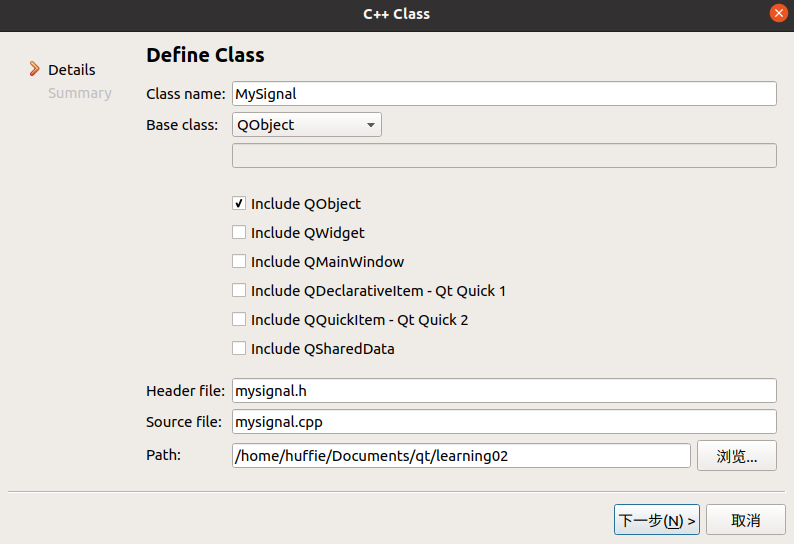
First, right-click the project, select Add New File, and create a new C++ class with QObject as its base class.
(2) Define Custom Signals and Slot Functions
Define custom signals under signals. The return type is void. They only need to be declared and do not need to be implemented. They can take parameters and can be overloaded.
//mysignal.h
#ifndef MYSIGNAL_H
#define MYSIGNAL_H

#include <QObject>

class MySignal : public QObject
{
    Q_OBJECT
public:
    explicit MySignal(QObject *parent = nullptr);

signals:
    void hello();   //添加了自定义信号

public slots:
};

#endif // MYSIGNAL_H
Define custom slot functions under public slots. The return type is void. They need to be both declared and implemented. They can take parameters and can be overloaded.
//myslot.h
#ifndef MYSLOT_H
#define MYSLOT_H

#include <QObject>

class MySlot : public QObject
{
    Q_OBJECT
public:
    explicit MySlot(QObject *parent = nullptr);

signals:

public slots:
    void printhello();    //添加了自定义槽
};

#endif // MYSLOT_H
Implement the slot function. QDebug can print the output string in the pane at the bottom:
//myslot.cpp
#include "myslot.h"
#include <QDebug>    //QDebug可在底部打印输出字符串

MySlot::MySlot(QObject *parent) : QObject(parent)
{

}

// 自定义槽函数实现
void MySlot::printhello()
{
    qDebug("Hello World!");    //输出HelloWorld
}
(3) Create Objects of the Two Classes and Connect Them with connect
First, declare pointers to the two classes in widget.h, and then create both objects with new in widget.cpp.
//widget.h
#ifndef WIDGET_H
#define WIDGET_H

#include <QMainWindow>
#include "mysignal.h"  //引入两个类的头文件
#include "myslot.h"

namespace Ui {
class widget;
}

class widget : public QMainWindow
{
    Q_OBJECT

public:
    explicit widget(QWidget *parent = 0);
    ~widget();

private:
    Ui::widget *ui;
    MySignal * mysignal;    //声明两个类的指针
    MySlot * myslot;
};

#endif // WIDGET_H
//widget.cpp
#include "widget.h"
#include "ui_widget.h"

widget::widget(QWidget *parent) :
    QMainWindow(parent),
    ui(new Ui::widget)
{
    ui->setupUi(this);

    this->mysignal = new MySignal;    //new两个对象
    this->myslot = new MySlot;
    connect(mysignal, &MySignal::hello, myslot, &MySlot::printhello);
}

widget::~widget()
{
    delete ui;
}
(4) Create a Trigger Function
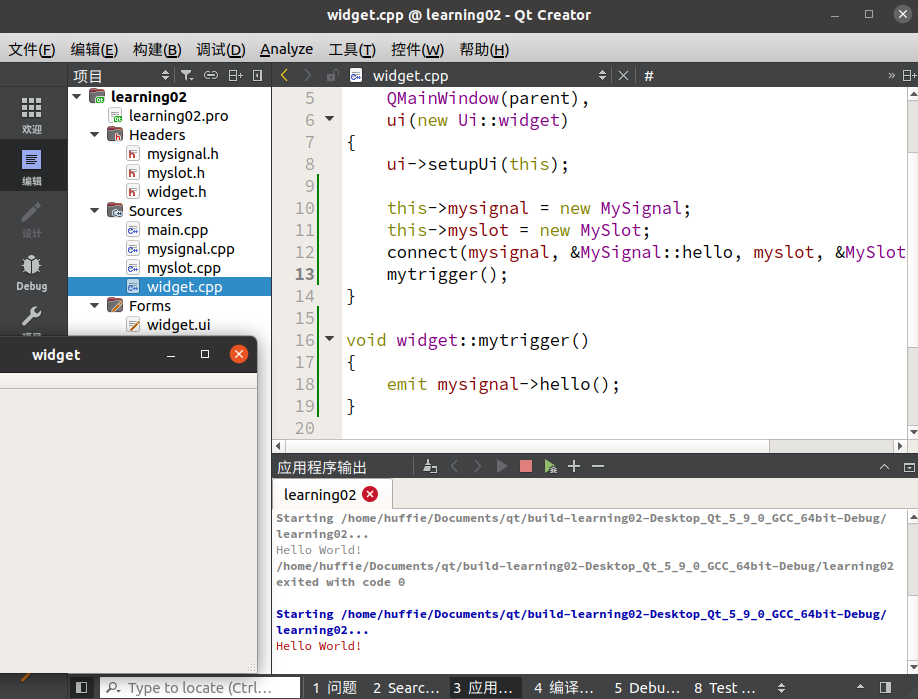
With only the code above, the two classes and the signal and slot functions have been defined, but there is no trigger condition. Running the program at this point produces no response.
Declare the trigger function in the private section of the widget class in widget.h:
#ifndef WIDGET_H
#define WIDGET_H

#include <QMainWindow>
#include "mysignal.h"
#include "myslot.h"

namespace Ui {
class widget;
}

class widget : public QMainWindow
{
    Q_OBJECT

public:
    explicit widget(QWidget *parent = 0);
    ~widget();

private:
    Ui::widget *ui;
    MySignal * mysignal;
    MySlot * myslot;
    void mytrigger();
};

#endif // WIDGET_H
Define the trigger function later in widget.cpp, and call it from widget:
#include "widget.h"
#include "ui_widget.h"

widget::widget(QWidget *parent) :
    QMainWindow(parent),
    ui(new Ui::widget)
{
    ui->setupUi(this);

    this->mysignal = new MySignal;
    this->myslot = new MySlot;
    connect(mysignal, &MySignal::hello, myslot, &MySlot::printhello);
    mytrigger();
}

void widget::mytrigger()
{
    emit mysignal->hello();
}

widget::~widget()
{
    delete ui;
}
II. Connecting and Disconnecting Signals
2.1 Connecting a Signal to Another Signal
connect can connect not only a signal to a slot, but also one signal to another, so that when one signal is triggered, it in turn triggers another signal.
connect(btn, &QPushButton::clicked, mysignal, &MySignal::hello);2.2 Disconnecting Signals and Slots
Use the disconnect keyword to disconnect a signal. Its parameters are exactly the same as those of connect.
disconnect(btn, &QPushButton::clicked, mysignal, &MySignal::hello)
Comments