Contents
I. Introduction
Staple combines local HOG features and global color-histogram features for object tracking.
The authors first found that color distributions were insufficient to distinguish the target from the background. Templates based on local features often perform poorly when dealing with severe deformation.
The authors did some related work on these two problems and reached the following conclusions.
- Convolutional filters are not robust to severe deformation.
- Online learning may cause model drift. In other words, the algorithm treats its predictions as positive samples for training and updates the model accordingly. Once a prediction is wrong, subsequent predictions will also be wrong.
- Color histograms do not consider pixel positions, which can reduce the effects of deformation to some extent.
- The correlation filter CF is relatively robust and can play a role when the target and background colors are not sufficiently distinguishable.
The authors therefore combined these methods to achieve object tracking.
II. Theoretical Method
2.1 Overall Method
For frame , rectangle can be used to select a target in image while maximizing the value of the scoring function. ( is the scoring function for rectangular window , scoring function is an image transform, and is the model parameter.)
A set of can be chosen to minimize the entire loss function. ( is a function related to the target positions in previous frames, and is the regularization term.)
2.2 Scoring Function
The f function consists of two terms: one is the template score, and the second is the histogram score. This formula represents, assuming that an image x is represented by
III. Paper Notes
The STAPLE object tracking algorithm combines two methods: HOG features and color histograms. HOG features are relatively robust to motion blur and illumination but are not sufficiently robust to deformation, whereas color histograms are highly robust to deformation but not sufficiently robust to illumination changes. The two methods can therefore complement each other, so they are both used and processed through two channels.
The algorithm uses a rectangular box to specify the target in the first frame, then tracks an unfamiliar object in the video while remaining robust to changes in its appearance. Because an object’s appearance may change considerably in a video, estimating the other frames solely from the model computed using the first frame would not be very effective. The usual approach is to update the model by using the prediction from each tracked frame as training data. When searching for the target position in each image frame, consider first searching through the various rotations of the image and then searching across scale changes.
IV. Code Test
The paper’s authors implemented this algorithm in MATLAB. I used the C++ implementation by GitHub expert xuduo35. The original GitHub project links are as follows:
Paper source code (MATLAB): https://github.com/bertinetto/staple xuduo35 (C++): https://github.com/xuduo35/STAPLE
This article refers to xuduo34’s code and uses the fhog.cpp, fhog.h, sse.hpp, staple_tracker.cpp, and staple_tracker.hpp files from that project. Only the main function code is included below.
int main(int argc, char * argv[]){
    // 数据定义
    STAPLE_TRACKER staple;  //创建staple跟踪对象
    std::vector<cv::Rect_<float>> result_rects;     //创建矩形容器,存储所有算法识别出的跟踪框
    cv::VideoCapture capture(0);	//创建VideoCapture类
    cv::Mat image;      //用来存储每一帧
    cv::Mat tempImage;  //每一帧的临时变量
    int64 tic, toc;     //算法运行时间起始点与终止点
    double time = 0;
    bool show_visualization = true;
    bool first_image = true;

    // 设置鼠标操作回调函数
    cv::namedWindow("STAPLE");
    cv::setMouseCallback("STAPLE", on_MouseHandle, (void*)&image);

    while(1){
        capture.read(image);	//逐帧读取视频
        flip(image, image, 1);	//将读取的视频左右反转
        if (image.empty()) {	//如果视频结束或未检测到摄像头则跳出循环
            break;
        }

        if(drawing_finished == false){
            // 鼠标按下drawing_box=true,在视频画面frame上画矩形
            if( drawing_box ){
                tempImage.copyTo(image);
                cv::rectangle(image,groundtruth_rect.tl(),groundtruth_rect.br(),cv::Scalar(0,0,255));// 画框
            }
            else{
                image.copyTo(tempImage);//拷贝源图到临时变量
            }
        }
        else{
            // 如果是第一帧图像,则进行staple初始化操作,反之则只更新staple
            if (first_image){
                // staple初始化操作
                staple.tracker_staple_initialize(image, groundtruth_rect);
                // staple目标追踪
                staple.tracker_staple_train(image, true);
                first_image = false;
            } else{
                groundtruth_rect = staple.tracker_staple_update(image);
                staple.tracker_staple_train(image, false);
            }
        }
        // 可视化部分
        if (show_visualization) {
            // 显示算法识别的跟踪框
            cv::rectangle(image, groundtruth_rect, cv::Scalar(0, 128, 255), 2);

            // 写入测试视频
            // ******************** //
            // video.write(image);
            // ******************** //

            // 输出图像显示结果
            cv::imshow("STAPLE", image);
            std::cout << "Center: [" << groundtruth_rect.tl().x +groundtruth_rect.width/2 << ", " << groundtruth_rect.tl().y + groundtruth_rect.height/2 << "]" << std::endl;

            char key = cv::waitKey(10);
            if (key == 27 || key == 'q' || key == 'Q')
                break;
        }


    }
    cv::destroyAllWindows();

}


/******************** 函数定义 ********************/
// 使轴对齐
cv::Rect_<float> getAxisAlignedBB(std::vector<cv::Point2f> polygon)
{
    double cx = double(polygon[0].x + polygon[1].x + polygon[2].x + polygon[3].x) / 4.;
    double cy = double(polygon[0].y + polygon[1].y + polygon[2].y + polygon[3].y) / 4.;
    double x1 = std::min(std::min(std::min(polygon[0].x, polygon[1].x), polygon[2].x), polygon[3].x);
    double x2 = std::max(std::max(std::max(polygon[0].x, polygon[1].x), polygon[2].x), polygon[3].x);
    double y1 = std::min(std::min(std::min(polygon[0].y, polygon[1].y), polygon[2].y), polygon[3].y);
    double y2 = std::max(std::max(std::max(polygon[0].y, polygon[1].y), polygon[2].y), polygon[3].y);
    double A1 = norm(polygon[1] - polygon[2])*norm(polygon[2] - polygon[3]);
    double A2 = (x2 - x1) * (y2 - y1);
    double s = sqrt(A1 / A2);
    double w = s * (x2 - x1) + 1;
    double h = s * (y2 - y1) + 1;
    cv::Rect_<float> rect(cx-1-w/2.0, cy-1-h/2.0, w, h);
    return rect;

}
// 获取groundtruth内的矩形坐标
std::vector<cv::Rect_<float>> getgroundtruth(std::string txt_file)
{
    std::vector<cv::Rect_<float>> rects;
    std::ifstream gt;
    gt.open(txt_file.c_str());
    if (!gt.is_open())
        std::cout << "Ground truth file " << txt_file
                  << " can not be read" << std::endl;
    std::string line;
    float x1, y1, x2, y2, x3, y3, x4, y4;
    while (getline(gt, line)) {
        std::replace(line.begin(), line.end(), ',', ' ');
        std::stringstream ss;
        ss.str(line);
        ss >> x1 >> y1 >> x2 >> y2 >> x3 >> y3 >> x4 >> y4;
        std::vector<cv::Point2f>polygon;
        polygon.push_back(cv::Point2f(x1, y1));
        polygon.push_back(cv::Point2f(x2, y2));
        polygon.push_back(cv::Point2f(x3, y3));
        polygon.push_back(cv::Point2f(x4, y4));
        rects.push_back(getAxisAlignedBB(polygon)); //0-index
    }
    gt.close();
    return rects;
}
// 第一帧画框鼠标响应
void on_MouseHandle(int event, int x, int y, int flags, void* param ){
    cv::Mat& image = *(cv::Mat*) param;
    switch( event)
    {
        //鼠标移动消息
        case cv::EVENT_MOUSEMOVE:
        {
            if( drawing_box )//如果是否进行绘制的标识符为真,则记录下长和宽到RECT型变量中
            {
                groundtruth_rect.width = x-groundtruth_rect.x;
                groundtruth_rect.height = y-groundtruth_rect.y;
            }
        }
            break;

            //左键按下消息
        case cv::EVENT_LBUTTONDOWN:
        {
            drawing_box = true;
            groundtruth_rect = cv::Rect( x, y, 0, 0 );//记录起始点
        }
            break;

            //左键抬起消息
        case cv::EVENT_LBUTTONUP:
        {
            drawing_box = false;//置标识符为false
            drawing_finished = true;
            //对宽和高小于0的处理
            if( groundtruth_rect.width < 0 )
            {
                groundtruth_rect.x += groundtruth_rect.width;
                groundtruth_rect.width *= -1;
            }

            if( groundtruth_rect.height < 0 )
            {
                groundtruth_rect.y += groundtruth_rect.height;
                groundtruth_rect.height *= -1;
            }
            //调用函数进行绘制
            cv::rectangle(image,groundtruth_rect.tl(),groundtruth_rect.br(),cv::Scalar(0,0,255));// 画框
        }
            break;
    }
}
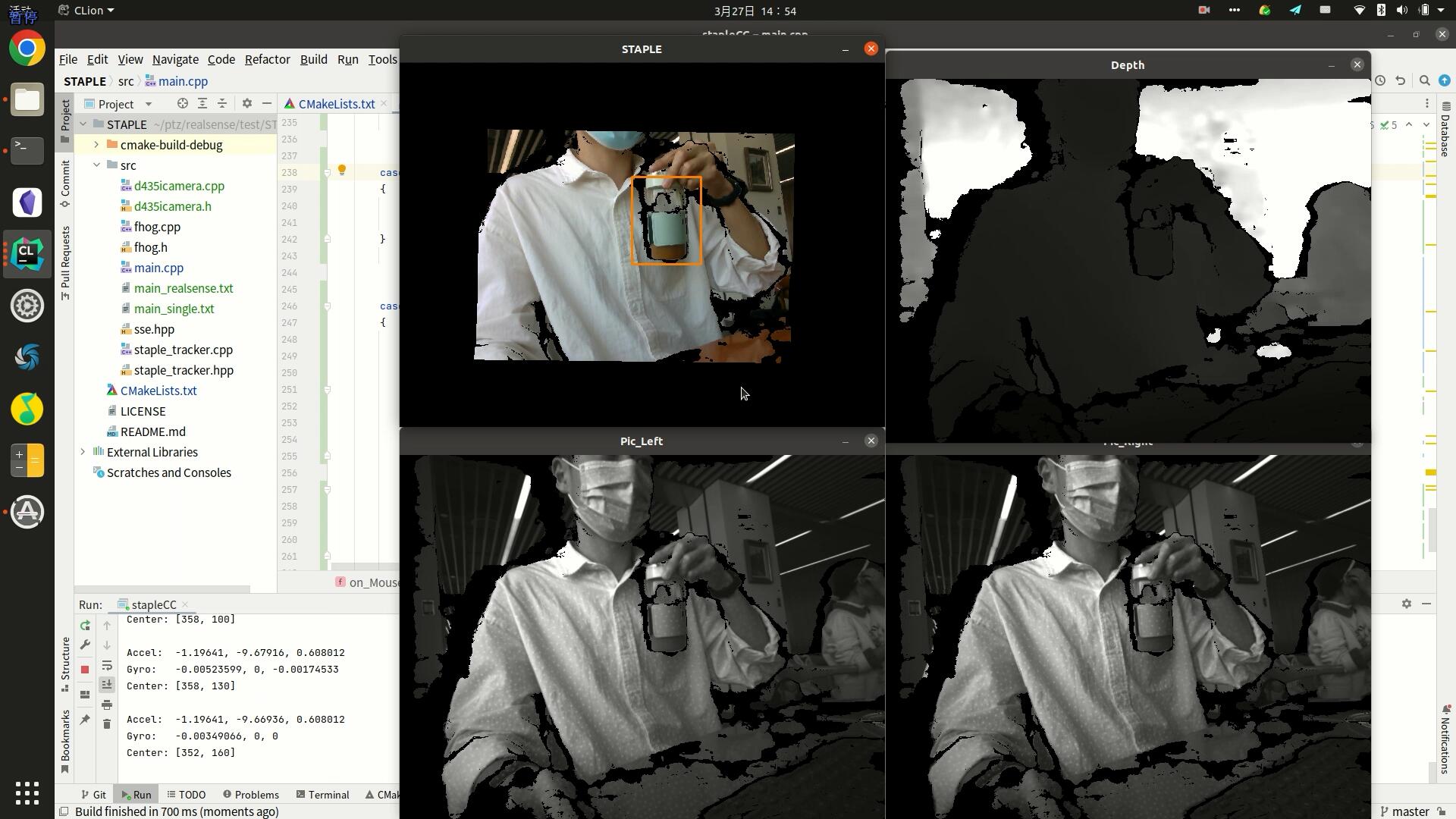
The figure below shows a test program adapted from the Staple object tracking program and combined with the depth images from a RealSense D435i camera.
Comments