Contents
Introduction
Use you-get, a project on GitHub, to download videos, images, and audio from most major websites.
Supported websites include YouTube, Twitter, Facebook, bilibili, AcFun, niconico, NetEase Cloud Music, Kugou Music, QQ Music, iQIYI, Tencent Video, Douyin, Kuaishou, Zhihu, and many others.
For detailed documentation, see https://github.com/soimort/you-get.
Prerequisites
1. Download and Install python3
Many tutorials are available online. Follow one of them to install the latest version of Python.
2. Install you-get
Press win+R, enter cmd, and open a Command Prompt window. Install you-get with the following command:
pip3 install you-getThen enter the code below to upgrade you-get:
python -m pip install --upgrade pip
pip3 install --upgrade you-get
Usage
1. View Available Download Quality and Formats
Copy the webpage link for the video or audio you want to download.
Use the --info/-i option to view all available download quality levels and formats:
you-get -i https://www.bilibili.com/video/BV1Ni4y1k7rv
2. Download Videos/Audio/Images
Running you-get directly downloads the first format listed under defalut and saves it to the command line’s current working directory.
you-get -i https://www.bilibili.com/video/BV1Ni4y1k7rvTo download a specific format, find the download command shown under that format and run it. For example, I want to download the mp4 version of this video:
you-get --format=dash-flv https://www.bilibili.com/video/BV1Ni4y1k7rv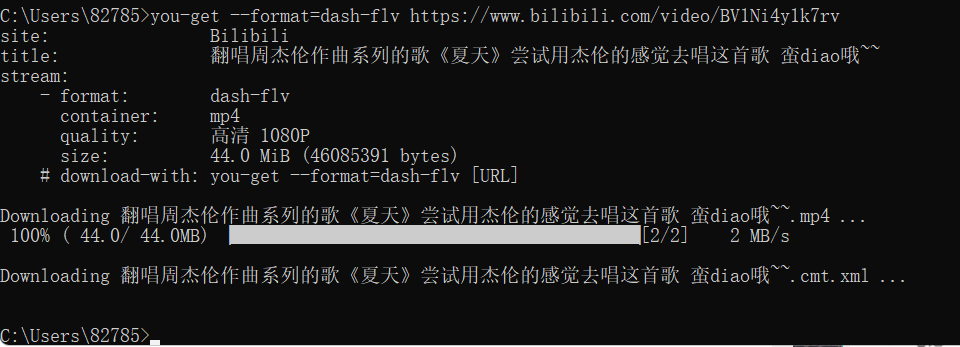
As you can see, the download is quite fast.
3. Set the Output Folder and Filename
Use the --output-dir/-o option to set the path, and use --output-filename/-O to set the downloaded file’s name:
you-get --format=dash-flv -o E:/Windows/VIDEOS -O 夏天 https://www.bilibili.com/video/BV1Ni4y1k7rv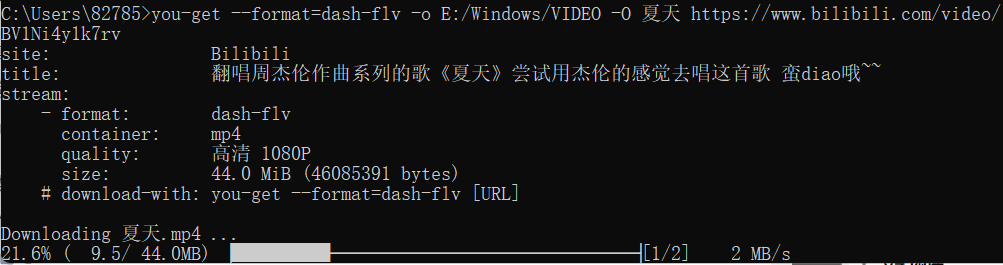
All modification patches, keygens, registration information, and software-related articles published on this blog are for study and research purposes only. The above content must not be used for commercial or illegal purposes; otherwise, users assume all consequences. The information on this site comes from the internet, and this site bears no responsibility for copyright disputes. You must completely delete the above content from your computer within 24 hours after downloading it. By accessing and downloading content from this site, you agree to the above terms.
Comments