Contents
Paper Notes
| Key | Value |
|---|---|
| Title | MimicPlay: Long-Horizon Imitation Learning by Watching Human Play |
| Journal Name | Conference on Robot Learning (CoRL) |
| Author Team | Stanford University |
| Year | 2023 |
| DOI | 10.48550/arXiv.2302.12422 |
| Code | https://github.com/j96w/MimicPlay |
1 Target Problem
Learning from human demonstrations is a promising way to teach robot manipulation skills.
Most current imitation learning algorithms are still limited to learning short-horizon manipulation tasks, such as opening a door or grasping a specific object.
Research on long-horizon tasks currently follows two directions: hierarchical imitation learning and learning from demonstration data. Hierarchical learning aims to learn from high-level planning to low-level motion control in an end-to-end manner. Learning from demonstration data refers to humans collecting data by teleoperating a robot to interact with the environment.
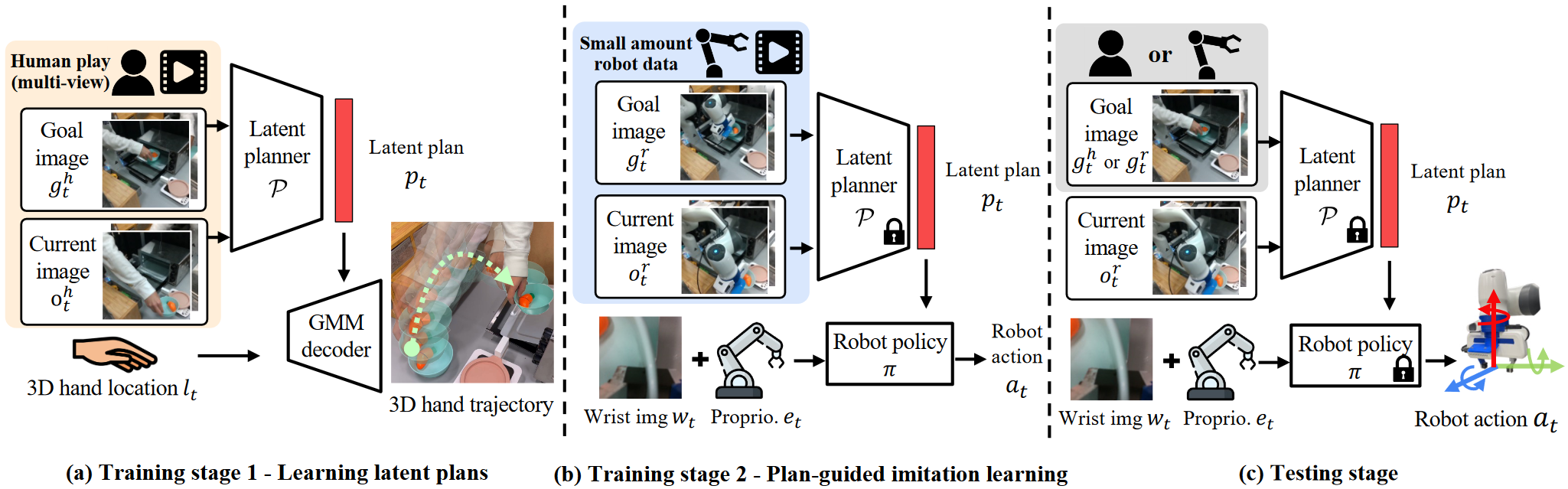
This paper proposes a hierarchical learning framework that learns latent plans from large amounts of human demonstration data and uses them to guide the robot in achieving visuomotor control from a small number of demonstrations.
2 Main Method
2.1 Collecting Human Data
As a human interacts with the environment using their hand, they create a hand trajectory. This paper uses two calibrated cameras to track 3D hand trajectories in human demonstration data, with hand positions detected using an existing library.
2.2 Learning 3D Latent Plans from Human Data
Problem: Given a long-horizon task represented by a goal image, the policy produces goal-conditioned actions.
The problem is transformed into a hierarchical learning policy. The high-level planner extracts key features from the goal image and converts them into a low-dimensional plan, which guides the motion controller’s actions. To train the high-level planner, this paper uses an inexpensive data source (human demonstration data)
(1) Multimodal Latent Plan Learning
Using the collected human demonstration data and the corresponding 3D hand trajectories, the learning procedure is transformed into a goal-conditioned 3D trajectory generation task. That is, the human demonstration images and goal images are processed into low-dimensional features, an MLP encodes them into a latent plan vector, and another MLP decodes the latent plan vector and hand position into a prediction of the 3D hand trajectory.
To address the differences between people demonstrating the same task, an MLP-based Gaussian mixture model is used to model the trajectory distribution from the latent plan.
(2) Addressing the Visual Differences Between Human Demonstrations and the Robot
Because this paper considers humans and robots operating in the same environment, it must address the visual differences caused by their different appearances. It computes the distributions of feature embeddings from the human and robot visual encoders and minimizes the distance between them (the robot and human videos do not need to correspond at this step)
2.3 Multi-Task Imitation Learning
(1) Video Prompts for Latent Plan Generation
A one-shot video is used as the goal-specification prompt and sent to the trained latent planner to generate a latent plan that the robot can execute.
The planner divides the video into multiple frames. At each time step, the planner takes one image frame from the sequence as the goal image and generates a latent plan to guide the robot’s actions.
(2) Transformer-Based Plan Guidance and Imitation
When executing complex tasks, high-level planning alone is insufficient; low-level details must also be considered. Therefore, the robot’s wrist camera input and proprioception are each converted into low-dimensional feature vectors and combined with the latent plan, then processed using a Transformer architecture (because it is well suited to long-horizon motion generation).
(3) Multi-Task
The same planner and policy model are shared across all tasks in the same environment.
Algorithm Reproduction
1 Environment Setup
(1) Enter the Downloaded Code Environment
cd MimicPlay(2) Create a conda Environment
conda create -n mimicplay python=3.8 -y
conda activate mimicplay
(3) Install MuJoCo
pip install mujoco==2.3.0If this problem occurs:
imgaug 0.4.0 requires XXXXXX, which is not installed.Solution:
- Install the dependencies required by imgaug as indicated by the error:
pip install imageio matplotlib Pillow scikit-image six opencv-python- Reinstall mujoco:
pip install mujoco
(4) Install robosuite
git clone https://github.com/ARISE-Initiative/robosuite.git
cd robosuite
git checkout v1.4.1_libero
pip install -r requirements.txt
pip install -r requirements-extra.txt
pip install -e .
The first installation failed; it succeeded only after
git checkout v1.4.1_libero
(5) Install BDDL
cd ..
git clone https://github.com/StanfordVL/bddl.git
cd bddl
pip install -e .
(6) Install LIBERO
cd ..
git clone https://github.com/Lifelong-Robot-Learning/LIBERO.git
cd LIBERO
pip install -r requirements.txt
pip install -e .
(7) Install robomimic
cd ..
git clone https://github.com/ARISE-Initiative/robomimic
cd robomimic
git checkout mimicplay-libero
pip install -e .
The first installation failed; it succeeded only after
git checkout mimicplay-libero
(8) Install MimicPlay
cd ..
git clone https://github.com/j96w/MimicPlay.git
cd MimicPlay
pip install -e .
2 Data Preparation (Learning Robot Actions from Simulated Robot Action Data)
2.1 Official Dataset
Download the training set and test videos here. The training set is a series of human demonstration videos without specified tasks (without labels).
The authors recommend downloading the raw data demo.hdf5 and then processing it locally into the training dataset demo_image.hdf5 with image observations, because this provides a good way to check whether the environment libraries are installed correctly. The specific steps are as follows:
(1) Move the Downloaded Dataset to mimicplay/datasets
For example:
cd MimicPlay/mimicplay
mkdir -p datasets/playdata
mv ~/Downloads/demo.hdf5 ./datasets/playdata/
(2) Convert the Raw Data into an Image Dataset
# 示例
cd MimicPlay/mimicplay
python scripts/preprocess_hdf5.py -i ./datasets/playdata/demo.hdf5 -o ./datasets/playdata/demo_modified.hdf5
python scripts/dataset_states_to_obs.py --dataset 'datasets/playdata/demo_modified.hdf5' --done_mode 0 --camera_names agentview robot0_eye_in_hand --camera_height 84 --camera_width 84 --output_name image_demo_local.hdf5 --exclude-next-obs
If this problem occurs:
ileNotFoundError: [Errno 2] No such file or directory: 'patchelf'Solution:sudo apt-get install patchelf
(3) Extract End-Effector Trajectories for Training the High-Level Planner
python scripts/dataset_extract_traj_plans.py --dataset 'datasets/playdata/image_demo_local.hdf5'(4) Check the Data: Replay the Images in the Dataset and Save Them as a Video
python scripts/playback_robomimic_dataset.py --dataset 'datasets/playdata/image_demo_local.hdf5' --use-obs --render_image_names agentview_image --video_path image_demo_local_replay.mp42.2 Custom Dataset
(1) Collect Data Using a BDDL File
python scripts/collect_playdata.py --bddl-file 'scripts/bddl_files/KITCHEN_SCENE9_playdata.bddl' --device 'keyboard'The collected raw data can be found under the robosuite/robosuite/models/assets/demonstrations/ path.
(2) Convert the Raw Data into robomimic Format
python scripts/convert_playdata_to_robomimic_dataset.py --dataset 'path_to_your_data'(3) Now that the data is in robomimic format, follow the steps in #1.3 Public Dataset to generate task-specific video prompts
3 Data Preparation (Learning Robot Actions from Human Demonstrations)
3.1 Configuring the Hand Detection Model
(1) Configure the Open-Source hand_object_detector
conda create --name handobj python=3.6
conda activate handobj
conda install pytorch=1.0.1 torchvision cudatoolkit=10.0 -c pytorch
cd mimicplay/scripts/human_playdata_process
git clone https://github.com/ddshan/hand_object_detector && cd hand_object_detector
pip install -r requirements.txt
cd lib
python setup.py build develop
(2) Download the Faster R-CNN Model and Place It in the Specified Location
Download faster_rcnn_1_8_132028.pth (361M) from Google Drive and move it to the path below
cd hand_object_detector
mkdir -p models/res101_handobj_100K/pascal_voc
mv faster_rcnn_1_8_132028.pth models/res101_handobj_100K/pascal_voc/.
(3) Place the MimicPlay Python Script in the Hand Detector Directory
cd mimicplay/scripts/human_playdata_process/
cp demo_mp4.py hand_object_detector/
3.2 Generating a Dataset from Human Demonstrations
(1) Copy the Two Example Videos
cp vis_1.mp4 hand_object_detector/
cp vis_2.mp4 hand_object_detector/
(2) Generate the HDF5 Data File
cd hand_object_detector/
python demo_mp4.py
(3) Visualize the Dataset
cd scripts/human_playdata_process/
python vis_processed_human_play_data.py
4 Training
4.1 Training the High-Level Planner
cd MimicPlay/mimicplay
python scripts/train.py --config configs/highlevel.json --dataset 'datasets/playdata/image_demo_local.hdf5'
After training, select the checkpoint with the highest evaluation score and use its path as
4.2 Training the Low-Level Robot Controller
References:
- MimicPlay: Long-Horizon Imitation Learning by Watching Human Play. [Project](MimicPlay | Long-Horizon Imitation Learning by Watching Human Play (mimic-play.github.io)) Code, arXiv
Comments