Contents
- I. Coordinate Transforms in Robots
- II. Example: Turtle Following Experiment
- 1. Turtle Following
- 2. Viewing TF Relationships
- 3. tf_echo Frame Relationships
- 4. RViz Three-Dimensional Visualization Platform
- III. Programming TF Frame Broadcasting and Listening
- 1. Create a Package
- 2. Create the TF Broadcaster Code
- 3. Create the Listener Code
- 4. Configure Build Rules for the Broadcaster and Listener
- 5. Build
- 6. Run the Programs
I. Coordinate Transforms in Robots
The TF package manages all coordinate frames. It keeps a ten-second history of the relationships among all frames and can show where a grasped object is relative to the robot’s center frame.
II. Example: Turtle Following Experiment
1. Turtle Following
After two turtles appear, one turtle is at the center and the other appears below. You can control the center turtle, and the lower turtle will automatically follow the turtle you control.
sudo apt-get install ros-noetic-turtle-tf
roslaunch turtle_tf turtle_tf_demo.launch
#rosrun turtlesim turtle_teleop_key
roslaunch starts a launch file and brings up the many nodes inside it. noetic is the ROS version number.
Press the arrow keys in the terminal to control the followed turtle.
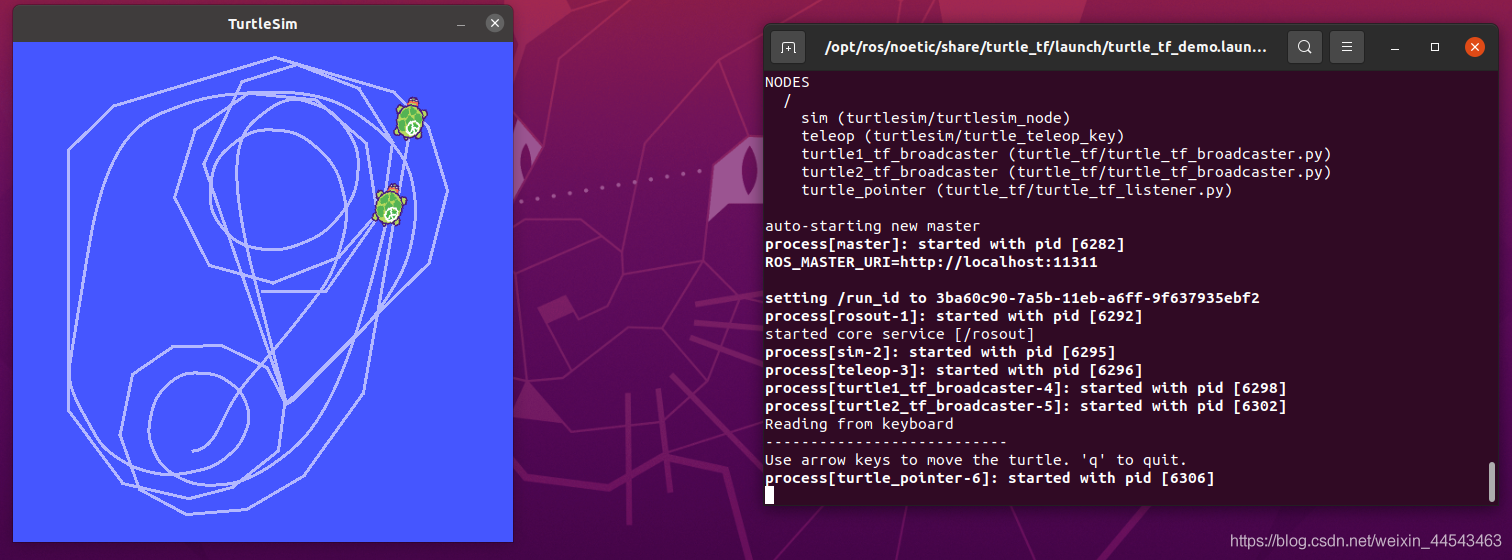
If you get an error on ubuntu20.04 noetic, you can try the fix below.
cd /usr/bin
sudo rm -r python		# 有的可能没有这个文件,就省略这一步
sudo cp python3 python
2. Viewing TF Relationships
rosrun tf view_framesWait 5 seconds. A PDF file is generated. Open it to see the TF frame relationships in the current system.
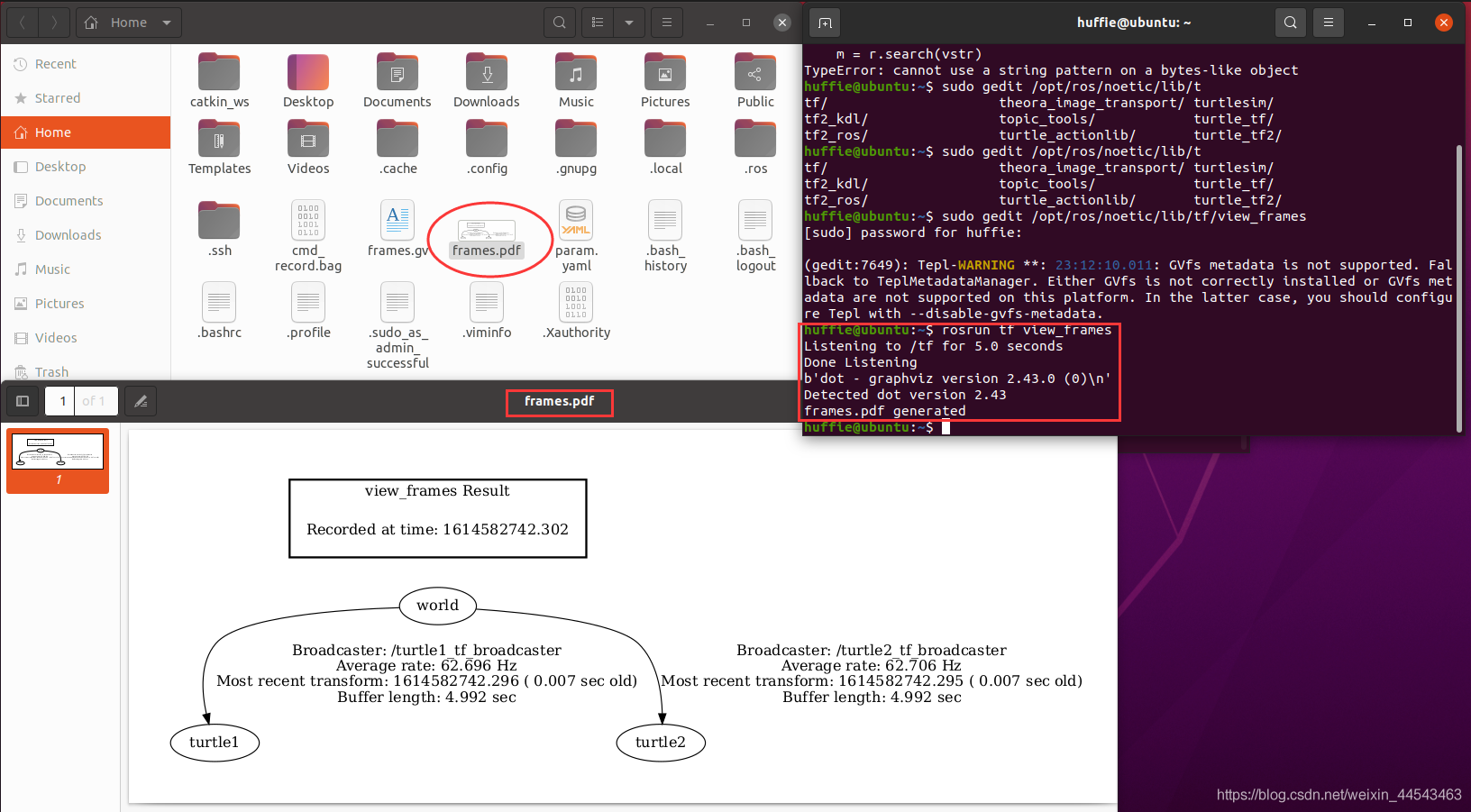
world is the global frame. turtle1 and turtle2 are the frames on the two turtles. The example’s goal is to make the two frames overlap in position.
If this step fails, edit the file that reports the error.
sudo gedit /opt/ros/noetic/lib/tf/view_framesOn line 88, aboveprint(vstr), addvstr=str(vstr).
3. tf_echo Frame Relationships
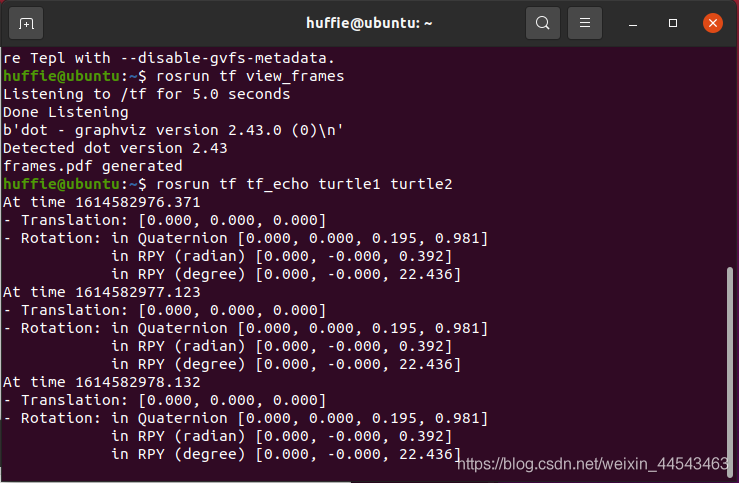
rosrun tf tf_echo turtle1 turtle2This prints the relationship between the two frames and describes how to transform the turtle2 frame into the turtle1 frame. It includes Translation and Rotation (rotation is described as a quaternion, in radians, and in degrees).
4. RViz Three-Dimensional Visualization Platform
rosrun rviz rviz -d 'rospack find turtle_tf' /rviz/turtle_rviz.rvizFirst, change Fixed Frame on the left to world.
Click Add in the lower-left corner and add a TF display to show TF frame relationships.
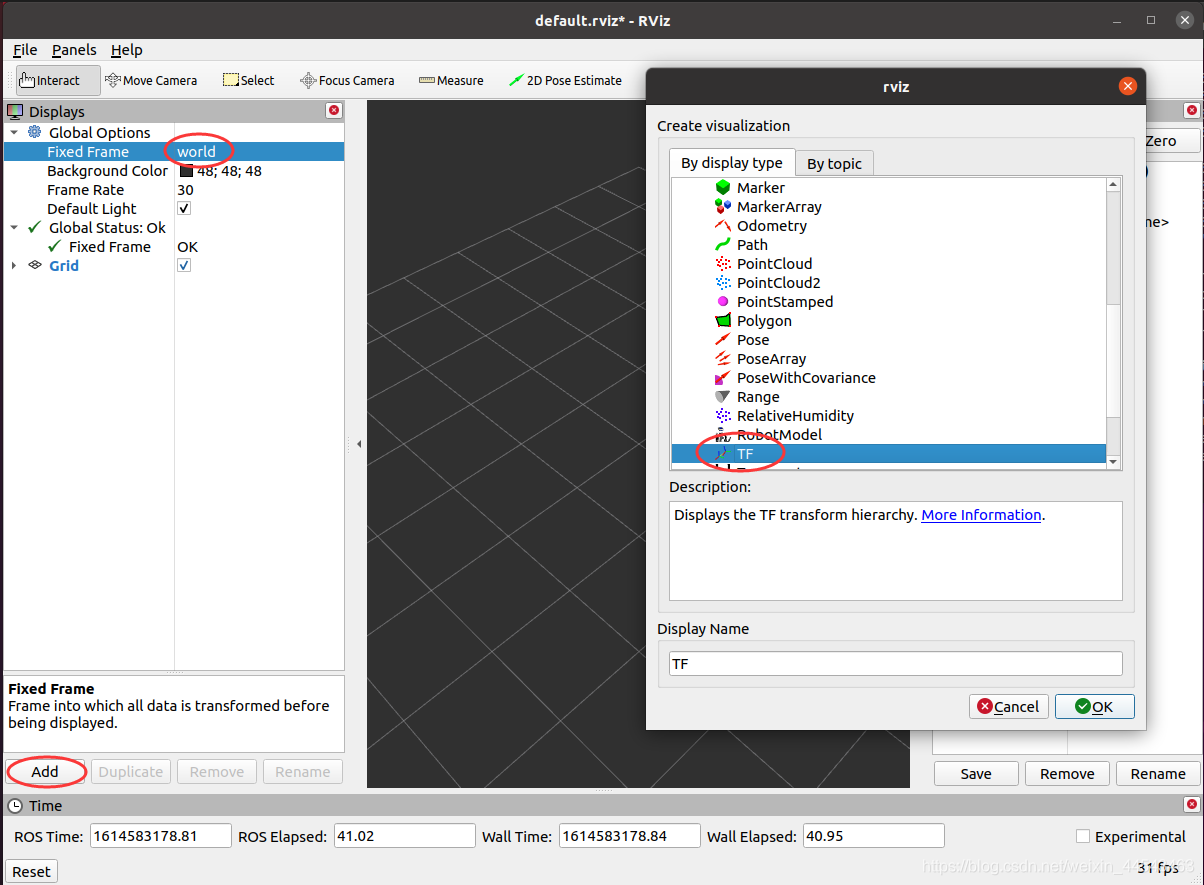
Control the turtle’s motion and you can see both frames moving in the view.

III. Programming TF Frame Broadcasting and Listening
1. Create a Package
cd ~/catkin_ws/src
catkin_create_pkg learning_tf roscpp rospy tf turtlesim
2. Create the TF Broadcaster Code
Open the learning_tf/src/ directory and create turtle_tf_broadcaster.cpp there.
Its contents are:
/**
 * 该例程产生tf数据,并计算、发布turtle2的速度指令
 * REFERENCE:www.guyuehome.com
 */

#include <ros/ros.h>
#include <tf/transform_broadcaster.h>
#include <turtlesim/Pose.h>

std::string turtle_name;

void poseCallback(const turtlesim::PoseConstPtr& msg)
{
	// 创建tf的广播器
	static tf::TransformBroadcaster br;

	// 初始化tf数据
	tf::Transform transform;
	transform.setOrigin( tf::Vector3(msg->x, msg->y, 0.0) );
	tf::Quaternion q;
	q.setRPY(0, 0, msg->theta);
	transform.setRotation(q);

	// 广播world与海龟坐标系之间的tf数据
	br.sendTransform(tf::StampedTransform(transform, ros::Time::now(), "world", turtle_name));
}

int main(int argc, char** argv)
{
    // 初始化ROS节点
	ros::init(argc, argv, "my_tf_broadcaster");

	// 输入参数作为海龟的名字
	if (argc != 2)
	{
		ROS_ERROR("need turtle name as argument");
		return -1;
	}

	turtle_name = argv[1];

	// 订阅海龟的位姿话题
	ros::NodeHandle node;
	ros::Subscriber sub = node.subscribe(turtle_name+"/pose", 10, &poseCallback);

    // 循环等待回调函数
	ros::spin();

	return 0;
};
3. Create the Listener Code
Likewise, create turtle_tf_listener.cpp with the following contents:
/**
 * 该例程监听tf数据,并计算、发布turtle2的速度指令
 * REFERENCE:www.guyuehome.com
 */

#include <ros/ros.h>
#include <tf/transform_listener.h>
#include <geometry_msgs/Twist.h>
#include <turtlesim/Spawn.h>

int main(int argc, char** argv)
{
	// 初始化ROS节点
	ros::init(argc, argv, "my_tf_listener");

    // 创建节点句柄
	ros::NodeHandle node;

	// 请求产生turtle2
	ros::service::waitForService("/spawn");
	ros::ServiceClient add_turtle = node.serviceClient<turtlesim::Spawn>("/spawn");
	turtlesim::Spawn srv;
	add_turtle.call(srv);

	// 创建发布turtle2速度控制指令的发布者
	ros::Publisher turtle_vel = node.advertise<geometry_msgs::Twist>("/turtle2/cmd_vel", 10);

	// 创建tf的监听器
	tf::TransformListener listener;

	ros::Rate rate(10.0);
	while (node.ok())
	{
		// 获取turtle1与turtle2坐标系之间的tf数据
		tf::StampedTransform transform;
		try
		{
			listener.waitForTransform("/turtle2", "/turtle1", ros::Time(0), ros::Duration(3.0));
			listener.lookupTransform("/turtle2", "/turtle1", ros::Time(0), transform);
		}
		catch (tf::TransformException &ex)
		{
			ROS_ERROR("%s",ex.what());
			ros::Duration(1.0).sleep();
			continue;
		}

		// 根据turtle1与turtle2坐标系之间的位置关系,发布turtle2的速度控制指令
		geometry_msgs::Twist vel_msg;
		vel_msg.angular.z = 4.0 * atan2(transform.getOrigin().y(),
				                        transform.getOrigin().x());
		vel_msg.linear.x = 0.5 * sqrt(pow(transform.getOrigin().x(), 2) +
				                      pow(transform.getOrigin().y(), 2));
		turtle_vel.publish(vel_msg);

		rate.sleep();
	}
	return 0;
};
4. Configure Build Rules for the Broadcaster and Listener
In learning_tf, configure CMakeLists.txt and add the following code at the location shown in the figure:
add_executable(turtle_tf_broadcaster src/turtle_tf_broadcaster.cpp)
target_link_libraries(turtle_tf_broadcaster ${catkin_LIBRARIES})

add_executable(turtle_tf_listener src/turtle_tf_listener.cpp)
target_link_libraries(turtle_tf_listener ${catkin_LIBRARIES})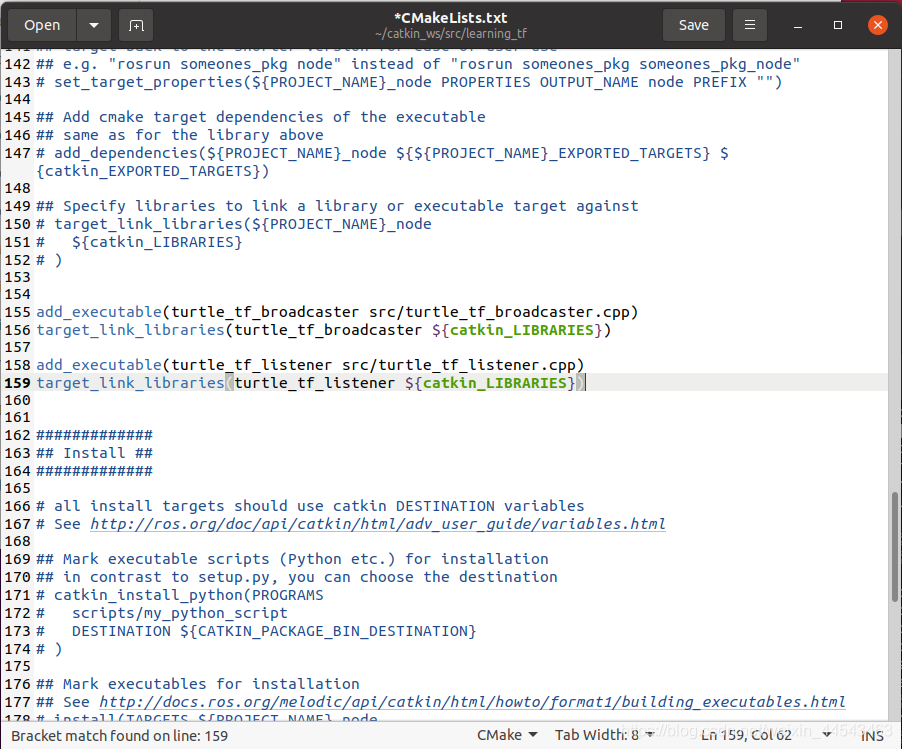
This compiles each of the two cpp files into its own executable and links the required libraries.
5. Build
cd ~/catkin_ws
catkin_make
6. Run the Programs
Run each line below in its own terminal.
roscore
rosrun turtlesim turtlesim_node
rosrun learning_tf turtle_tf_broadcaster __name:=turtle1_tf_broadcaster /turtle1
rosrun learning_tf turtle_tf_broadcaster __name:=turtle2_tf_broadcaster /turtle2
rosrun learning_tf turtle_tf_listener
rosrun turtlesim turtle_teleop_key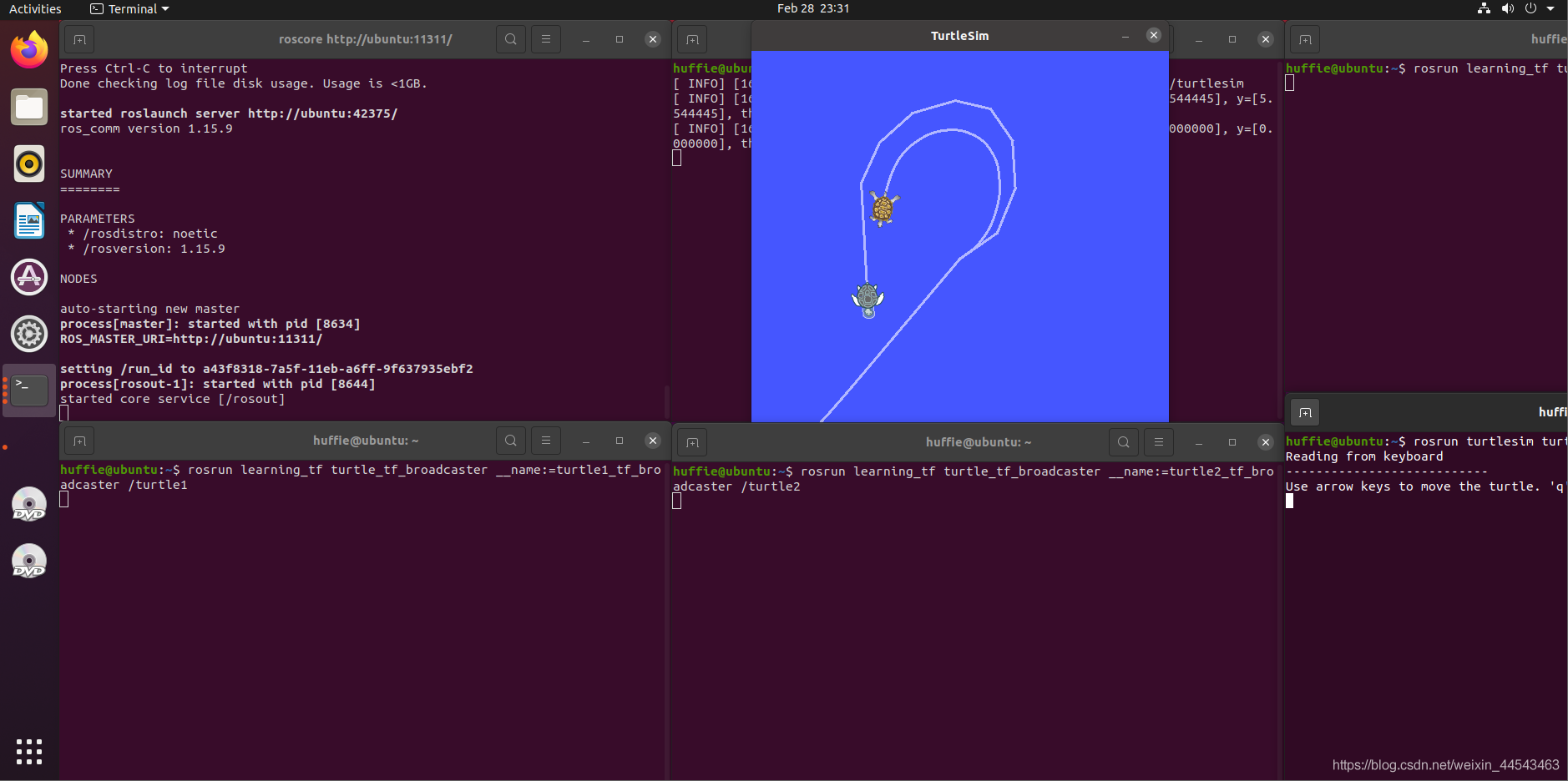
Comments