Contents
I. Paper Notes
Title: Contact-GraspNet: Efficient 6-DoF Grasp Generation in Cluttered Scenes Conference: ICRA2021 Authors: Martin Sundermeyer (NVIDIA) Year: 2021 Code: https://github.com/NVlabs/contact_graspnet Dataset:
1.1 Objective
The paper proposes an end-to-end network that generates a distribution of 6D grasps from image depth data.
1.2 Method
Using a raw depth map and, optionally, an object mask, the network generates 6D grasp proposals and grasp widths.
(1) Grasp Representation
For most predictable two-finger grasps, at least one of the two contact points is visible before grasping. The grasping problem can therefore be simplified to estimating the 3D grasp rotation and grasp width of a parallel-jaw gripper.
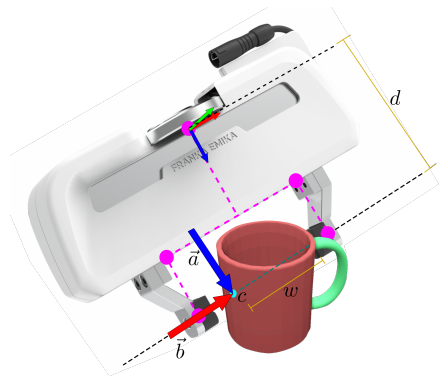
Here, a is the approach vector, b is the grasp baseline vector, and d is the distance from the grasp baseline to the gripper base. This representation speeds up learning, improves prediction accuracy, and has no ambiguities or discontinuities.
(2) Data Generation
The method uses the ACRONYM dataset. Object meshes with dense grasp annotations are placed in random stable poses within the scene. Grasp poses that cause the gripper to collide with the model are removed.
(3) Network
The set abstraction and feature propagation layers introduced in PointNet++ are used to build an asymmetric U-shaped network.
The network has four detection heads. Each detection head consists of two 1D convolutional layers and outputs s∈R, z1∈R3, z2∈R3, and o∈R10 for each point, from which the grasp representation is constructed.
The grasp width is divided into 10 equally spaced grasp widths to counteract data imbalance, after which the grasp-width representation with the highest confidence is selected. Because the approach and baseline directions are orthogonal, this property is incorporated into training by orthonormalizing the predictions, which helps regress the 3D rotation.

1.3 Thoughts
Grasp poses are predefined in the dataset and then used for supervised training. During use, the object region is first identified from the depth map, and its point cloud is then used to predict the grasp distribution.
Creating datasets for custom objects is difficult.
II. Algorithm Reproduction
2.1 Preparation
(1) Environment Setup
Download the code:
git clone https://github.com/NVlabs/contact_graspnet.gitCreate a virtual environment. (This environment works correctly. If a dependency does not meet the requirements, you can remove that entry first, create the environment, and then install it manually.)
conda env create -f contact_graspnet_env.yml
conda activate contact_graspnet_env
Recompile pointnet_tfops:
sh compile_pointnet_tfops.sh(2) Model and Data Preparation
Download the trained models from the link provided by the authors and place them in ./checkpoints/. Download the test data and place it in ./test_data.
2.2 Grasp Prediction
Given a depth map (.npy file/unit m), camera intrinsics, and a 2D instance segmentation map, run the following command:
python contact_graspnet/inference.py \
       --np_path=test_data/0.npy \
--local_regions --filter_grasps--np_path: Input .npz/.npy file containing depth, intrinsics, an instance segmentation map, and RGB information
--ckpt_dir: Checkpoint directory; defaults to checkpoint/scene_test_2048_bs3_hor_sigma_001. Use scene_2048_bs3_rad2_32 for very clean depth data and scene_test_2048_bs3_hor_sigma_0025 for very noisy depth data
--local_regions: Cropped 3D instance segmentation
--filter_grasps: Filters grasp points so that they lie only on the object’s surface
--skip_border_objects: Ignores instance segmentations that touch the edge of the depth map
--forward_passes: Number of forward passes; increasing it provides more sampled grasp points
--z_range: The z values in [min, max] used to crop the input point cloud
--arg_configs TEST.second_thres:0.19 TEST.first_thres:0.23: Overrides the configured grasp confidence to obtain more or fewer grasp candidates
2.3 Network Training
(1) Download the Dataset
- Download the ACRONYM dataset
- Download the ShapeNet meshes from https://www.shapenet.org/
- Create watertight meshes
- Download and build https://github.com/hjwdzh/Manifold
- Create a watertight mesh, assuming the object path is model.obj:
manifold model.obj temp.watertight.obj -s - Simplify it:
simplify -i temp.watertight.obj -o model.obj -m -r 0.02
Download 10000 tabletop training scenes with Contact grasp information from Google Drive, then extract them into the following structure:
acronym
├── grasps
├── meshes
├── scene_contacts
└── splits
(2) Train Contact-GraspNet
If training on a server without peripherals, set the environment variable:
export PYOPENGL_PLATFORM='egl'Start training using the configuration file contact_graspnet/config.yaml:
python contact_graspnet/train.py --ckpt_dir checkpoints/your_model_name \
                                 --data_path /path/to/acronym/data
(3) Generate Your Own Contact Grasps and Scenes
The downloaded scene_contacts was generated from the ACRONYM dataset. To generate your own dataset, download and install acronym_tools.
First, the objects’ 6D grasps are mapped to contact points saved in mesh_contacts:
python tools/create_contact_infos.py /path/to/acronymBased on the generated mesh_contacts, tabletop scenes can be created and saved to scene_contacts:
python tools/create_table_top_scenes.py /path/to/acronymOne thread takes about 3 days. You can run the command multiple times to process the data in parallel on multiple cores.
Visualize the created tabletop scenes and grasps:
python tools/create_table_top_scenes.py /path/to/acronym \
       --load_existing scene_contacts/000000.npz -vis
Comments