Contents
Title: DenseFusion: 6D Object Pose Estimation by Iterative Dense Fusion Authors: Stanford University (Fei-Fei Li) Venue: CVPR Year: 2019 Code: https://sites.google.com/view/densefusion/
Introduction
Previous pose estimation methods either extracted RGB and depth map features separately or used expensive post-processing procedures, such as PoseCNN. This greatly limited their use in cluttered scenes and their real-time performance.
This paper proposes a heterogeneous architecture that processes the two data sources (RGB and depth maps) separately and uses a novel dense fusion network to extract dense pixel-level features for pose estimation.
The paper also proposes an end-to-end pose refinement step that further improves the estimation process and enables near-real-time inference.
Model
The model in this paper is designed to estimate object 6D poses from a series of RGB-D images. Without loss of generality, a 6D pose is represented by a homogeneous transformation matrix, namely a rotation matrix and a translation matrix . Because an object’s 6D pose is obtained from the camera, all results are relative to the camera reference frame.
The key is how to extract features from the two different data sources (RGB and depth maps) and fuse them appropriately.
Overall Architecture
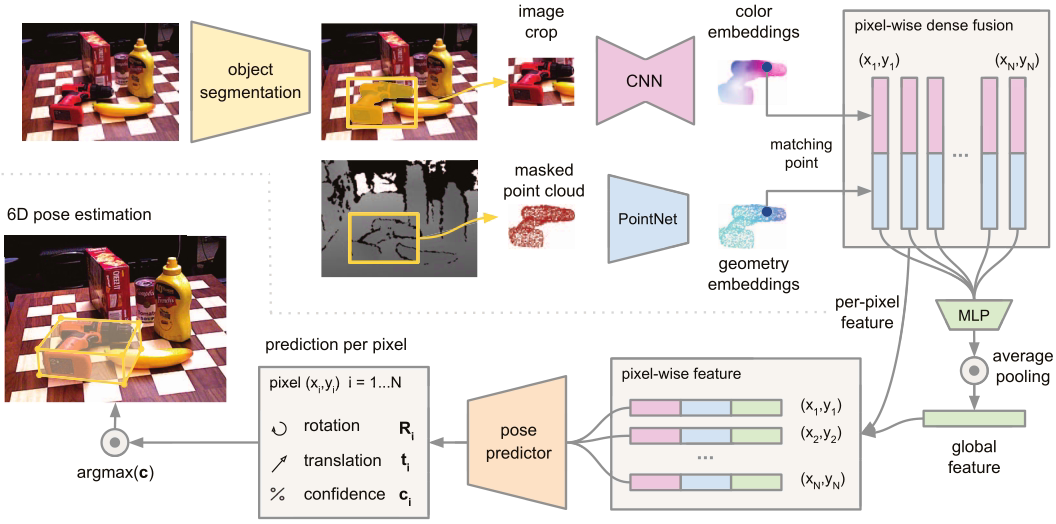
The overall architecture consists of two main stages:
- Stage one: Perform semantic segmentation on the RGB image to segment all known target objects. Then pass the image regions corresponding to the masks, along with the depth pixels, to the second stage.
- Stage two: Process the segmentation results and estimate the objects’ 6D poses. This stage contains the following components:
- A fully convolutional network that processes color information and maps each pixel in the cropped image to a color feature vector
- A PointNet-based point cloud processing network that processes the point cloud corresponding to the mask into a geometric feature vector
- A pixel-level fusion network that fuses the two feature vectors above and outputs an object 6D pose estimate based on an unsupervised confidence score
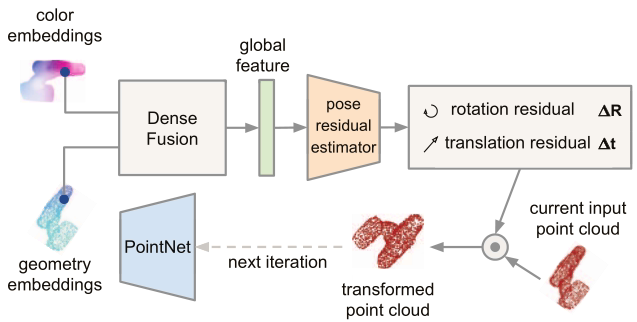
- An iterative self-refinement method that trains the network in a learned manner and iteratively refines the estimates
Semantic Segmentation
The semantic segmentation network takes an image as input and produces an N+1-channel semantic segmentation map (background + N object classes), with each channel representing a two-dimensional mask.
The paper uses an existing semantic segmentation architecture: the semantic segmentation branch proposed by PoseCNN.
Dense Feature Extraction
The color and depth information are processed separately to obtain color and geometric features from their respective feature vectors.
(1) Dense 3D Point Cloud Features
Previous methods usually process depth information as an additional image channel, but doing so ignores the 3D structural information implicit in the depth channel. This paper therefore converts the depth pixels segmented by the mask into a point cloud, then uses a PointNet-like architecture to extract geometric features.
PointNet takes the raw point cloud as input and learns to encode both information around each point and the point cloud as a whole. The paper proposes a geometric feature network that generates dense point-wise features by mapping every point in the segmented point cloud to a feature map.
(2) Dense Color Features
The image feature generation network is a CNN-based encoder-decoder architecture that maps an image from to . The feature vector at each pixel represents the appearance information at that point in the input image.
Pixel-Level Feature Fusion
The key idea is to perform local pixel-level fusion rather than global fusion, allowing predictions to be made from each fused feature. This makes it possible to select the visible parts of an object for prediction, reducing the effects of occlusion and noise from semantic segmentation.
First, each point’s geometric feature is associated with its image feature by projecting it onto the image plane using the camera intrinsics. The paired features are fed into another network, which uses a symmetric reduction function to produce a fixed-size global feature that enriches each pixel-level feature.
Each pixel feature is then passed to a final network that predicts the object’s 6D pose. This network predicts one pose from each dense fused feature, ultimately producing P poses.
The network also outputs a confidence value for each predicted pose to evaluate which pose estimate is best.
Loss Function
The loss function is designed similarly to that of PoseCNN.
The paper defines the loss function as the distance between sampled model points under the ground-truth pose and the corresponding model points under the predicted pose.

For symmetric objects, the loss function is defined as the distance between each point on the predicted model and its nearest point under the ground-truth pose.

In addition, because the prediction for each pixel also outputs a confidence value, that confidence is used to weight the loss for each pixel.

Iterative Refinement
Previous pose estimation algorithms usually use ICP for refinement. However, ICP is not sufficiently real-time for practical applications.
This paper proposes a neural-network-based iterative refinement method that uses densely fused features to improve the final pose estimation results, making them robust and fast.
Because this network refines pose estimates to reduce error, the prediction from the previous iteration must be used as part of the input to the next iteration.
The method treats the previously predicted pose as an estimate of the target object’s coordinate frame and transforms the input point cloud into that estimated coordinate frame. A point cloud transformed in this way implicitly contains the pose estimated in the previous step. The transformed point cloud is then fed into the network to predict a residual based on the previously estimated pose, producing a more accurate pose estimate through repeated iterations.
Questions
-
new_target and new_points are points from the current point cloud after an inverse transformation. What do these points represent?
-
The img input to PoseNet is the image in the mask region after instance segmentation. How is instance segmentation implemented during testing?
Code Implementation
Reference: https://blog.csdn.net/weixin_44564705/article/details/125149491
Download the Code
Original authors:
- Original version: https://github.com/j96w/DenseFusion
git clone https://github.com/j96w/DenseFusion- Pytorch-1.0: https://github.com/j96w/DenseFusion/tree/Pytorch-1.0
git clone -b Pytorch-1.0 https://github.com/j96w/DenseFusionRTX 30-series GPU compatibility:
- Code built by darpado: https://github.com/drapado/DenseFusion-1/tree/Pytorch-1.6
- Then modify loss_refiner.py as described in this comment
Environment Setup
(1) Create a conda environment
Use Anaconda to create a virtual environment.
conda create --name densefusion python=3.6Activate the virtual environment.
conda activate densefusion(2) Configure CUDA and PyTorch
Follow the Pytorch1.0 branch provided by the GitHub author and download the corresponding versions.
# 原版
conda install pytorch==1.0.0 torchvision==0.2.1 cuda100 -c pytorch
# 30系
conda install pytorch==1.8.0 torchvision==0.9.0 torchaudio==0.8.0 cudatoolkit=11.1 -c pytorch -c conda-forge
After installing CUDA and PyTorch, enter python on the command line, then use the following code to confirm whether CUDA is available:
import torch
print(torch.__version__)
print(torch.version.cuda)
print(torch.cuda.is_available)
(3) Install dependencies
pip install opencv-python -i https://pypi.tuna.tsinghua.edu.cn/simple
pip install trimesh
conda install scipy pyyaml matplotlib -yDataset Preparation
Reference: Create Your Own LINEMOD Dataset (ObjectDatasetTools)
KNN Dependency
knn needs to be compiled in your own environment. Various errors can occur at this step with RTX 30-series GPUs, so it is recommended to use the source code modified by darpado and modify loss_refiner.
cd lib/knn
python setup.py build
python setup.py install
After running these commands, a dist folder containing the compiled .egg file will appear under lib/knn. Extract that file:
cd dist
#输入你自己的编译文件名
unzip knn_pytorch-0.1-py3.6-linux-x86_64.egg
After extraction, two folders will be created inside the dist folder. Enter the knn_pytorch folder and move the following two files into lib/knn:
cd knn_pytorch
cp knn_pytorch.cpython-36m-x86_64-linux-gnu.so ../../
cp knn_pytorch.py ../../
Start Training
Return to the DenseFusion root directory and make the sh file executable.
./experiments/scripts/train_linemode.shPossible Errors
- libgio-2.0.so.0: undefined symbol: g_uri_join while importing cv2 in conda environmnent
Reference: https://github.com/opencv/opencv/issues/20212
mv ~/anaconda3/envs/<anaconda_env>/lib/libgio-2.0.so.0 ~/anaconda3/envs/<anaconda_env>/lib/libgio-2.0.so.0.backup
Comments